
npm v12 is GA: npm install now asks before running dependency code
For years, npm install did much more than download files. It automatically ran dependency preinstall, install, and postinstall hooks, invoked an implicit node-gyp rebuild when it found binding.gyp, and resolved Git repositories or remote tarballs without a separate grant. npm v12 is now generally available, and that default has flipped. Installation is becoming a policy decision about which external code receives execution capability.
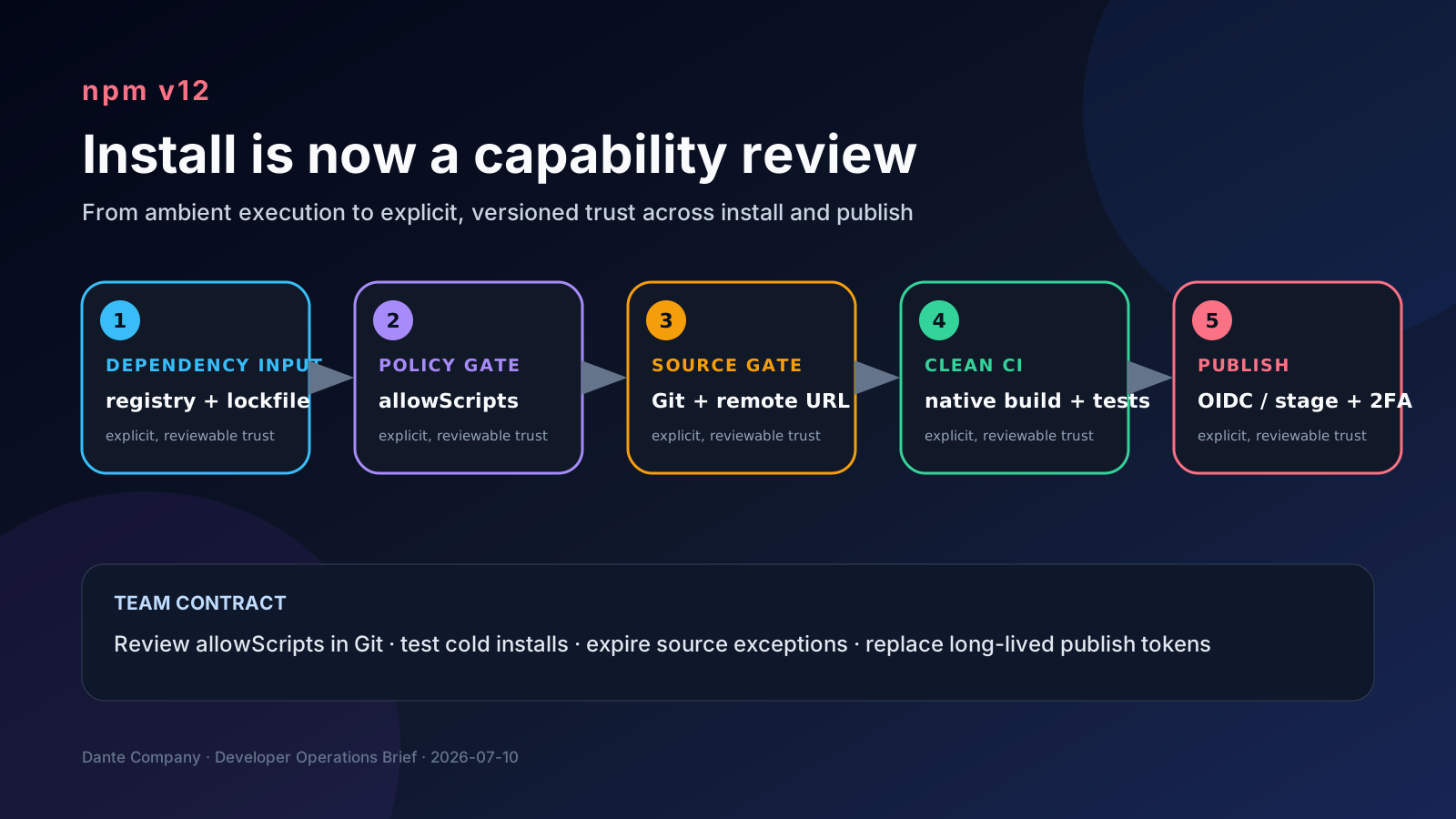
What changed
GitHub announced on July 8, 2026 that npm v12 is generally available and tagged latest. In v12, allowScripts defaults to off, so dependency lifecycle scripts and implicit node-gyp builds do not run unless approved. --allow-git and --allow-remote also default to none, so Git dependencies and remote URL dependencies such as HTTPS tarballs require explicit permission.
Teams could preview the migration through warnings in npm 11.16.0 and later. The official flow is to list pending packages with npm approve-scripts --allow-scripts-pending, approve only reviewed packages with npm approve-scripts, and commit the resulting allowScripts policy in package.json. npm deny-scripts records an explicit denial for packages that should never run install scripts.
The publishing boundary is changing too. GitHub expects 2FA-bypass granular access tokens to stop bypassing 2FA for sensitive account, package, and organization operations in early August 2026. Direct publishing with those tokens is expected to be reduced around January 2027, with trusted publishing through OIDC or staged publishing plus human 2FA approval as the recommended migration paths. Those are announced estimates, not guaranteed dates.
Why working developers should care
This is not just another security flag. It changes the trust model from “choosing a package implies trusting its install-time code” to separate decisions for downloading, resolving non-registry sources, and executing code. A lockfile can pin bytes, but it does not remove the ability of an install script to read files, inspect environment variables, contact the network, or compile native code.
The allowScripts field in package.json therefore becomes a supply-chain policy artifact. Reviewers need to know why sharp, esbuild, a database driver, or a browser package needs installation capability; whether approval is version-pinned or name-wide; and what happens when a new transitive dependency introduces a script. Developer laptops, CI runners, and container builds need the same policy for reproducibility.
The risk is sharper in teams that let coding agents add dependencies. When an agent hits an install failure, a global escape hatch such as allow-scripts=true may look attractive. Committing it would erase the boundary npm v12 just added. Agent-generated dependency changes still need a human capability review.
Where builds are likely to fail first
Native modules are the first obvious group. A package with binding.gyp can require approval even without a declared install script because npm historically invoked node-gyp rebuild implicitly. Projects that rely on native image processing, cryptography, database drivers, or browser downloads should exercise clean CI installs before changing the default toolchain.
Git and remote URL dependencies are the second group. Direct or transitive uses of github:user/repo, git+https://..., or HTTPS tarballs no longer resolve under the new defaults. Teams using unreleased commits or internal artifact URLs must decide whether to publish registry packages or document a narrow exception.
Workspaces add another wrinkle: npm's current approve-scripts documentation says the command is unaware of workspaces. Do not assume one approval at the repository root automatically governs every workspace. Validate the working directory and the exact package.json policy that each CI job reads.
Caches can hide missing approvals. A previously compiled binary or downloaded artifact may let a warm build pass. Include at least one cold npm ci run on an empty runner and cache when validating the policy.
Community signal
Developer discussion clusters around two themes. Many see default-deny install scripts as overdue because package installation has long carried an implicit arbitrary-code-execution surface. Others are worried about migration friction in native addons, Git-heavy monorepos, and the clarity of diagnostics when an approved build step is blocked.
Those reactions are useful as an operating signal, not a source of truth for feature behavior. They tell teams to invest in ownership, review evidence, and actionable CI errors. The confirmed behavior and migration commands should still come from the GitHub changelog and npm documentation.
A practical migration checklist
1. Standardize local and CI environments on npm 11.16.0 or later and collect v12 migration warnings from normal npm ci and npm install flows.
2. Capture npm approve-scripts --allow-scripts-pending output, then review each package's scripts, source repository, distribution method, and required file or network access.
3. Prefer version-pinned approvals. A name-wide approval grants execution capability to future versions and widens the review boundary around automated dependency updates.
4. Record unnecessary or unexplained scripts with npm deny-scripts. Treat broad bypass flags as temporary diagnostics, not the migration plan.
5. Classify Git, remote URL, file, and directory sources in the lockfile. Give every exception an owner, reason, and expiry date.
6. Run clean CI across supported operating systems and Node.js versions, including a cold install without native binary caches.
7. Require elevated review when Renovate or Dependabot changes allowScripts, instead of treating it as an ordinary version bump.
8. For package publishing, replace long-lived write tokens with OIDC trusted publishing; use npm stage publish plus human 2FA approval for high-impact packages.
Publishing is moving to the same model
npm trusted publishing creates an OIDC trust relationship between a CI workflow and npm, issuing short-lived, workflow-specific credentials at publish time. It reduces the need to store, rotate, and redact long-lived write tokens. npm's documentation is explicit that trusted publishing covers publishing, not authentication for installing private dependencies.
Staged publishing uploads a tarball with npm stage publish, then requires a maintainer to review and approve it with 2FA in the CLI or on npmjs.com before it becomes public. It has prerequisites, including an existing package and supported tool versions, so teams should test it rather than assuming it is a drop-in switch.
Taken together, the direction is coherent. Package consumers explicitly approve dependency code execution, while package producers use workflow identity and, where appropriate, a human approval gate. Both ends of the supply chain move from ambient trust to reviewable capability.
Risks and counterarguments
The first objection is productivity. A blocked native build will tempt teams to restore the old global behavior. Separate one-time migration cost from the permanent policy: build the allowlist on a pilot branch, validate it in a CI matrix, and only then promote npm v12.
The second risk is approval theater. A name approved forever is not meaningful governance. Prefer pinned entries, re-review on upgrades, prune stale policy, and protect changes with CODEOWNERS.
The third issue is ecosystem variance. npm policy does not automatically govern pnpm or Yarn. A monorepo that permits multiple package managers needs an explicit script/build approval model for each one.
Finally, npm v12 does not eliminate supply-chain attacks. Malicious runtime code and compromised approved scripts remain possible. Pair the new defaults with lockfiles, provenance, dependency review, least-privilege CI, secret isolation, and egress controls.
npm v12 migration checkpoints
✓Standardize local and CI environments on npm 11.16.0 or later and collect v12 migration warnings from normal npm ci and npm install flows.
✓Capture npm approve-scripts --allow-scripts-pending output, then review each package's scripts, source repository, distribution method, and required file or network access.
✓Prefer version-pinned approvals. A name-wide approval grants execution capability to future versions and widens the review boundary around automated dependency updates.
✓Record unnecessary or unexplained scripts with npm deny-scripts. Treat broad bypass flags as temporary diagnostics, not the migration plan.
✓Classify Git, remote URL, file, and directory sources in the lockfile. Give every exception an owner, reason, and expiry date.
✓Run clean CI across supported operating systems and Node.js versions, including a cold install without native binary caches.
✓Require elevated review when Renovate or Dependabot changes allowScripts, instead of treating it as an ordinary version bump.
✓For package publishing, replace long-lived write tokens with OIDC trusted publishing; use npm stage publish plus human 2FA approval for high-impact packages.
Bottom line
The practical meaning of npm v12 is bigger than a few broken installs. Treat npm install as an execution-capability grant, review allowScripts changes like code, make Git and remote-source exceptions narrow and expiring, and move package publishing toward OIDC and staged approval. Start in npm 11.16.0 warning mode, inventory the real execution surface, then prove the policy on clean CI.
Sources
- GitHub Changelog: npm install-time security and GAT bypass2fa deprecation
- GitHub Changelog: Upcoming breaking changes for npm v12
- npm Docs: npm approve-scripts
- npm Docs: npm deny-scripts
- npm Docs: Staged publishing for npm packages
- npm Docs: Trusted publishing for npm packages
- Reddit r/javascript: Upcoming breaking changes for npm v12