
Copilot Agent Tasks API 讓 coding agent 變成工程工作佇列
coding agent 正在離開聊天側欄。透過 GitHub Automations 與 Agent tasks REST API,團隊可以用程式啟動並追蹤 Copilot cloud agent 任務。
問題不再只是 prompt 寫得好不好,而是哪些事件會建立任務、agent 使用什麼權限、誰 review PR、失敗如何被看見。
GitHub 說明 Automations 可依排程或 repository event 執行。Agent tasks REST API 處於 public preview,並有特定 permission 與 token 條件。
Copilot cloud agent 在 GitHub Actions 驅動的環境中工作,可建立 branch、執行 checks,並開啟 pull request。因此它更像平台 worker。
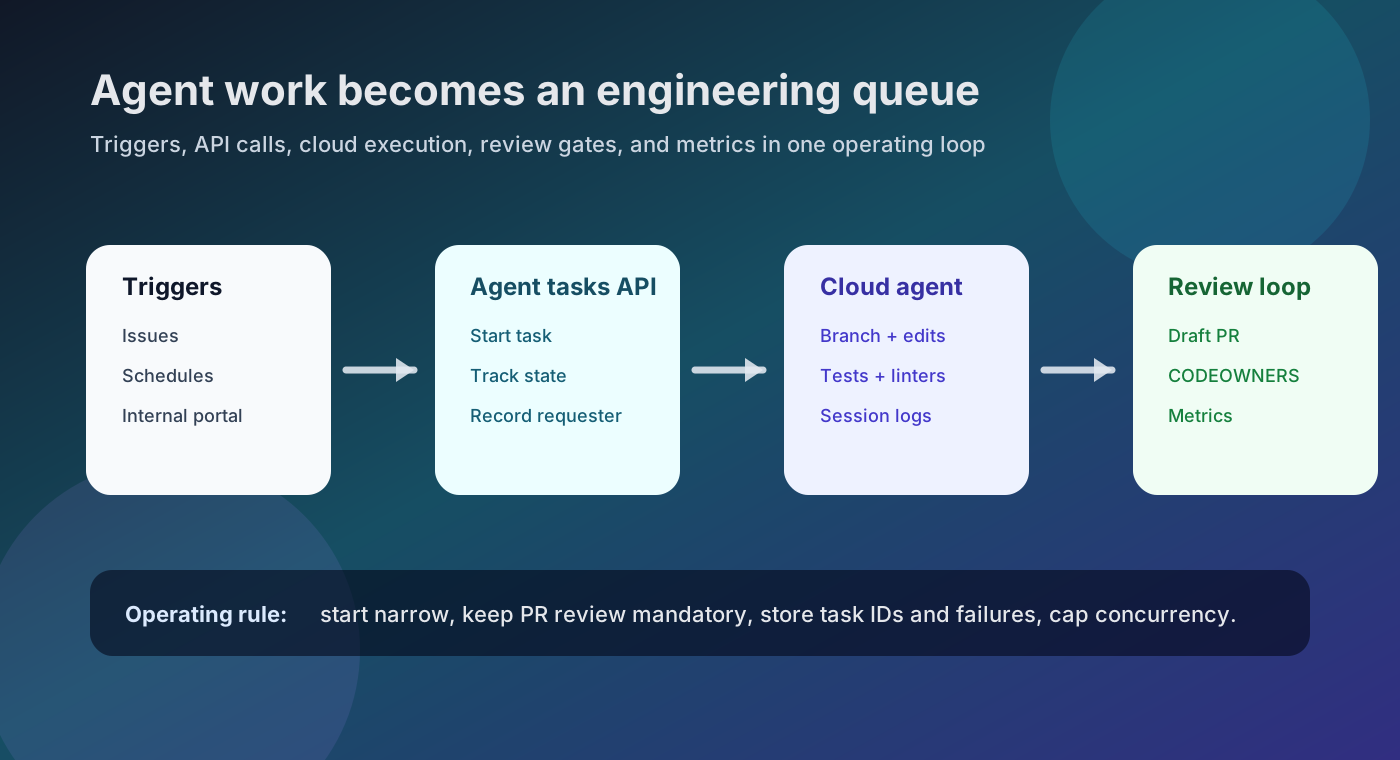
發生了什麼
| Area | Decision |
|---|---|
| Trigger | 第一個 workflow 限於 schedule、issue、PR 或入口按鈕。 |
| Permission | 記錄 Agent tasks permission 與 token authority。 |
| Output | 預設輸出 draft PR、checks 與摘要。 |
| Observability | 保存 task ID、state、PR、failure reason 與 cost signal。 |
| Review | 套用與一般 PR 相同的規則。 |
為什麼重要
AI coding 正從個人生產力工具變成共享的營運表面。
它適合 release notes、測試補強、小型 refactor 與 triage;但 prompt、token 與 review 若未受控,也會製造風險。
社群訊號
社群已詢問定期執行 agent,以及透過 API 讀取狀態或失敗。這些不是產品事實來源,而是需求訊號。
對工程營運的影響
backlog 會更主動產生 PR 候選。平台團隊必須定義 trigger、concurrency、logs、cost signals 與 review routing。
實務檢查清單
• 定義 agent 可碰觸的 repositories 與 branches。
• prompt template 放入目標、限制、驗證與 PR 格式。
• 限制 concurrency 與 retry。
• 把 failures 與 PRs 連到 ticket/dashboard。
• 沒有 human review 不 merge。
風險與反論
public preview API 可能變動。agent PR 仍需要 CODEOWNERS、branch protection、required checks 與 security scans。
內部入口必須記錄誰要求任務,以及任務以哪種 token authority 啟動。
從小處開始
先選一個 private/internal repository 與低風險任務,例如 release notes 草稿或失敗測試分析。先證明 logging 與 review flow,再擴大。
API 實驗應從小 request 開始。token scope 與 requester identity 應由平台管理。
POST /agents/repos/{owner}/{repo}/tasks
{
  "prompt": "Draft release notes for the changes merged this week. Open a pull request with sources and validation steps.",
  "base_ref": "main",
  "create_pull_request": true
}
來源
- GitHub Changelog: Schedule and automate tasks with Copilot cloud agent
- GitHub Changelog: Agent tasks REST API now available for Copilot Pro, Pro+, and Max
- GitHub Docs: REST API endpoints for agent tasks
- GitHub Docs: Using Copilot cloud agent via the API
- GitHub Docs: Creating automations with Copilot cloud agent
- GitHub Docs: About GitHub Copilot cloud agent
- GitHub Community discussion: Read-only API for Copilot Coding Agent session status and failures
- Reddit discovery signal: Could Copilot coding agent run on a schedule?