
Google Colab CLI:把 GPU 交給代理前先定好規則
Colab CLI 讓本機終端與 AI 代理操作遠端 Colab runtime。真正的重點是認證、quota、產物、日誌與清理。
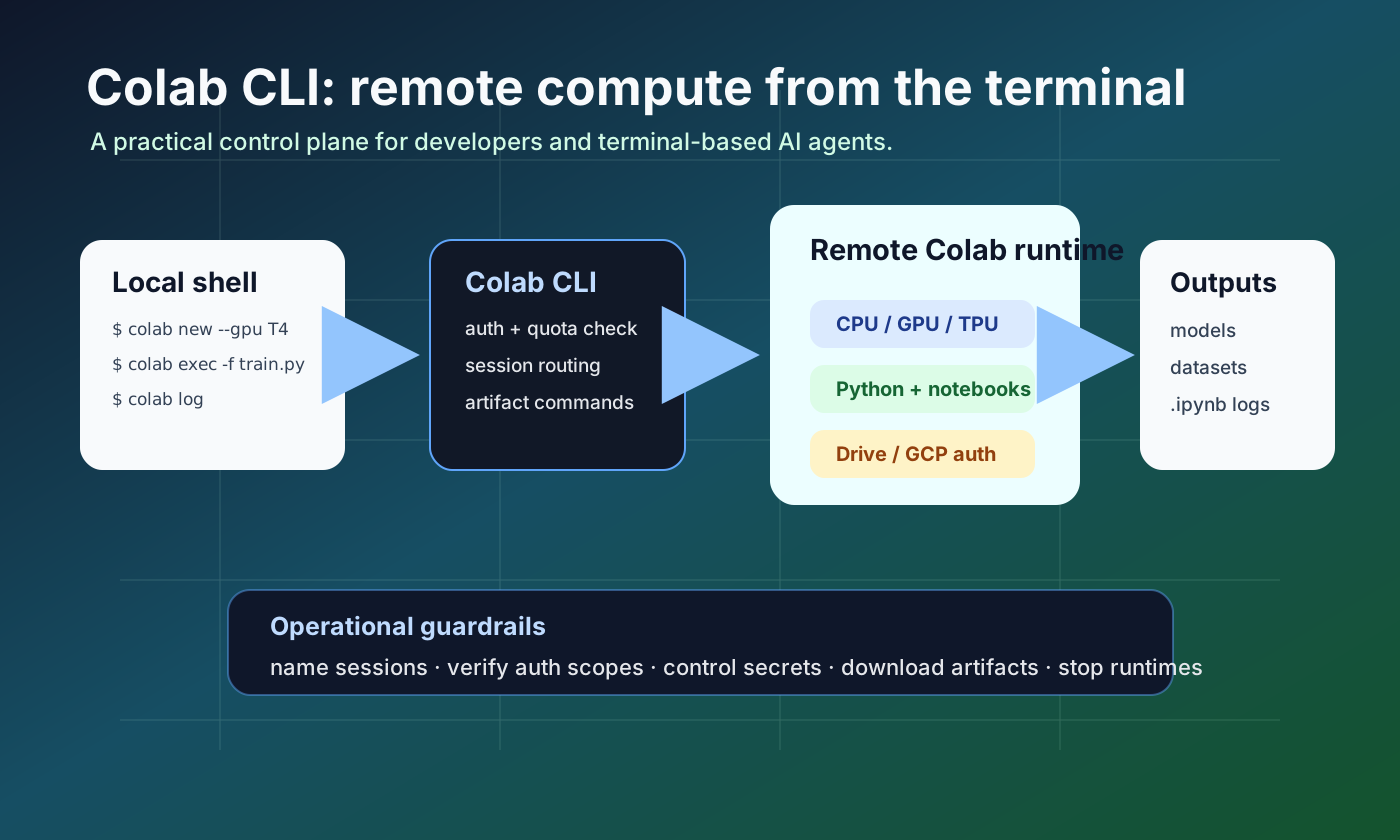
Google 在 2026 年 6 月 5 日發布 Colab CLI。開發者可以從終端建立 runtime、遠端執行本機腳本、下載產物、保存 notebook log,並停止 session。
發生了什麼
Google 在 2026 年 6 月 5 日發布 Colab CLI。開發者可以從終端建立 runtime、遠端執行本機腳本、下載產物、保存 notebook log,並停止 session。
為什麼重要
這讓 Colab 從瀏覽器 notebook 變成可程式化的遠端執行環境。擁有 shell access 的 AI 代理可以把 GPU/TPU 工作納入計畫。
社群訊號
InfoQ 與 Help Net Security 都強調開發者與代理場景。GitHub issue 也已經出現 secrets、runtime 選擇、資源報告與分配錯誤等問題。
對團隊的影響
團隊應把 Colab CLI 視為 remote execution surface。需要記錄誰建立 session、跑了哪些檔案、安裝哪些套件、下載哪些 artifact、何時釋放 runtime。
檢查清單
導入前固定 session name,記錄 auth scope,定義 GPU/TPU 失敗 fallback,隔離 secrets 與資料,保存 colab log,並在 colab stop 後檢查 colab sessions。
風險
它不是完整 MLOps 平台。長時間訓練、嚴格成本歸屬、網路隔離或企業政策仍較適合專用 job infrastructure。
團隊導入規則
✓ 記錄 session 名稱、擁有者與目的
✓ 文件化 auth mode 與 scopes
✓ 定義 GPU/TPU fallback
✓ 將 secrets 與資料和 prompt 分離
✓ 保存日誌與 artifacts
✓ colab stop 後檢查 sessions
結論
它不是完整 MLOps 平台。長時間訓練、嚴格成本歸屬、網路隔離或企業政策仍較適合專用 job infrastructure。
來源
- Google Developers Blog: Introducing the Google Colab CLI
- googlecolab/google-colab-cli repository
- Google Colab CLI COLAB_SKILL.md
- Google Colab CLI open issues
- InfoQ: Google Launches Colab CLI for Developers, Automation, and AI Agents
- Help Net Security: Google Colab CLI opens runtimes to Claude Code and Codex