
AI SDK 7: agent apps now need an execution contract before more tools
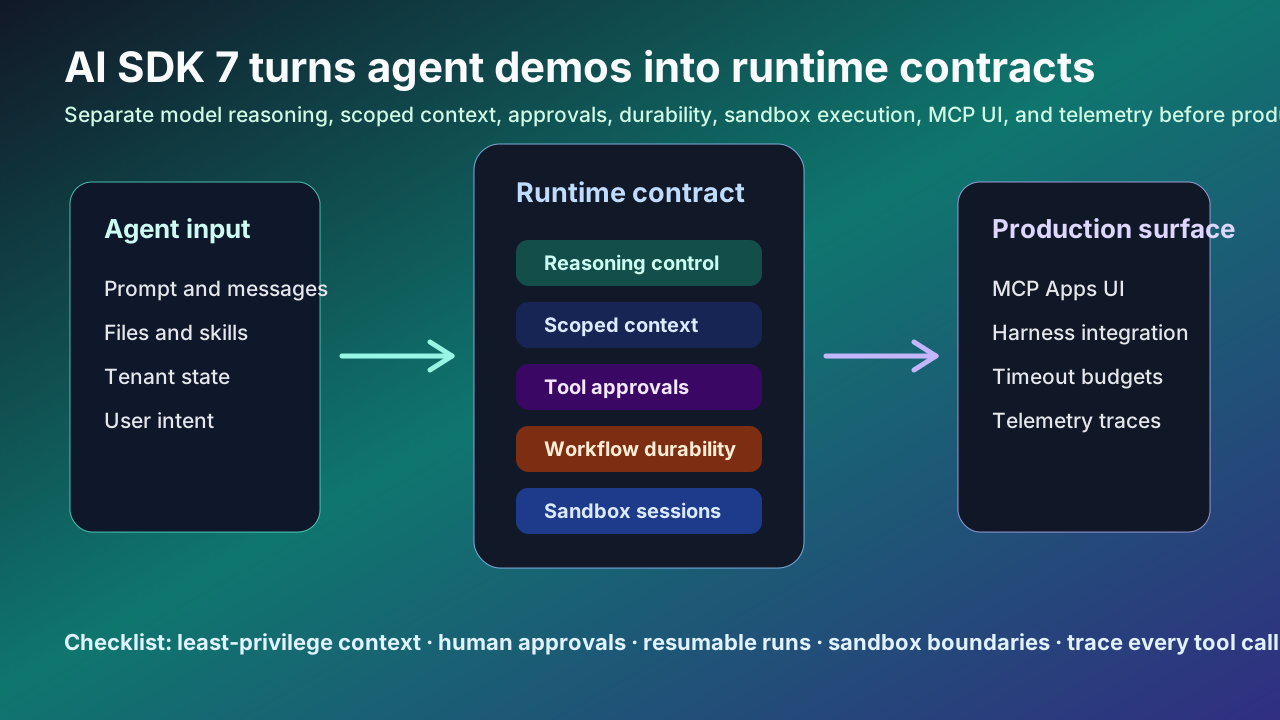
An AI agent app is no longer a model call wrapped in a chat screen. It reads files, calls MCP tools, waits for human approval, runs across multiple steps, and sometimes delegates to external coding harnesses. Vercel released AI SDK 7 on June 25, 2026, and the interesting part is not the demo surface. It is the way the SDK turns agent execution into a set of explicit runtime contracts.
Execution contract read
The practical takeaway from AI SDK 7 is not that agent APIs got bigger. It is that production agents need explicit contracts for reasoning, context, approval, durability, sandboxing, UI, and telemetry. If you are starting an agent product now, design the permission map and trace model before polishing the chat screen.
What happened
Vercel’s AI SDK 7 release expands agent development, execution, harness integration, observability, and multimodal support at the same time. The official announcement highlights reasoning control, tool and runtime context, provider file and skill uploads, MCP Apps, a terminal UI, tool approvals, WorkflowAgent, first-class timeouts, sandbox support, HarnessAgent, and telemetry.
That matters because production AI failures are moving beyond “the model answered poorly.” Teams now deal with tools that receive too much state, approvals that need replay protection, long-running jobs that cross deploys, credentials accidentally mixed into prompts or telemetry, and MCP UIs that need to be separated from model-visible tools.
AI SDK 7 gives each of those concerns its own surface. Reasoning is standardized across providers through a single option. Tool context is scoped through schemas. Runtime context belongs to the loop. Files and skills can be uploaded once and reused as provider references. MCP Apps can render interactive tool UI in sandboxed iframes instead of reducing every tool result to plain text.
Why this matters to working developers
The first practical shift is keeping execution state out of the prompt. Vercel’s context guide recommends passing tenant data, feature flags, session data, request IDs, credentials, and access tokens through runtimeContext, toolsContext, and contextSchema instead of prompt text. That separation improves security, debugging, and reasoning quality because the model should not reason about every value code needs to execute.
The second shift is approval as application policy. AI SDK 7 supports per-tool user approvals, approval functions, catch-all approval functions, and for higher-risk workflows, HMAC-signed approvals with replay hardening. A confirmation button is not enough. Teams need to revalidate the tool input, user state, and policy before execution continues.
The third shift is durability. WorkflowAgent is designed for runs that wait for a human, span multiple steps, or cross restarts and deploys. If an agent is tied to one HTTP request, production will eventually expose the weak point: a deploy restarts the process, a stream stalls, or an approval arrives after the runtime forgot what it was doing.
The fourth shift is UI. MCP Apps let tools expose interactive UI through ui:// resources while the host renders the UI in a sandboxed iframe. Agent screens are becoming review, configuration, approval, and comparison surfaces, not just transcript viewers.
Community signal
Recent Vercel Community AI SDK topics cluster around cost calculation, streaming tool output, BYOK production failures, reasoning trace persistence, Bedrock Guardrails, and multi-agent workflows. These are not standalone factual sources, but they are a useful demand signal. Developers are spending more time on cost, permissions, provider behavior, context, and stream recovery than on the first chatbot.
Older Reddit and Hacker News discussions around the AI SDK point in the same direction. Developers like fast starts and provider abstraction, but production pressure forces them to understand provider-specific behavior, hook performance, observability, and custom tool contracts. AI SDK 7 does not remove those questions. It exposes more of them as first-class API decisions.
The field has moved from “which tools can I attach?” to “which tenant state and credentials can this tool see, who approved the action, where does the run resume, and how will cost and trace data be audited?”
Development and operations impact
The permission model changes first. A single shared runtime object is convenient, but it lets third-party tools and MCP servers see values they do not need. Tool-scoped context pushes teams toward least privilege.
The deployment model changes next. Long-running agents need timeout budgets, resumable workflow state, richer callbacks, invalid tool-call handling, and policy revalidation. Without those, approvals can outlive their inputs or runs can disappear during deploys.
Frontend architecture changes too. MCP Apps and the TUI make agent output more than a message list. The application must render tool UI, hide app-only tools from the model, and bridge allowed interactions carefully.
Observability becomes mandatory. The release emphasizes telemetry registration, Node.js tracing channel support, lifecycle events, tool executions, usage, errors, and selected context capture. Cost and quality investigations need one trace across model calls, steps, tools, approvals, timeouts, and sandbox sessions.
A practical checklist
1. Divide agent state into prompt, runtimeContext, and toolsContext; keep credentials out of prompts and broad telemetry.
2. Add contextSchema per tool, especially for third-party and MCP tools.
3. Require approval for destructive actions, billing operations, external writes, shell commands, and file operations, then revalidate inputs before execution.
4. Move multi-step or human-gated runs toward durable execution with WorkflowAgent or an equivalent workflow layer.
5. Set separate total, per-step, per-chunk, and per-tool timeout budgets.
6. For MCP Apps, document model-visible tools, app-only tools, iframe sandboxing, and the allowed tool bridge.
7. Trace model calls, steps, tool executions, approvals, runtime context keys, and usage in one observability path.
8. When migrating from AI SDK 6, review context migration, approval policy, and provider file or skill references separately from the codemod.
Risks and counterarguments
The first risk is abstraction cost. AI SDK 7 smooths provider differences, but reasoning effort, file uploads, skill uploads, sandboxes, and guardrails still have provider-specific limits. The right goal is a common integration surface with explicit escape hatches, not a belief that every model behaves the same.
The second risk is under-designed trust boundaries. MCP Apps and external tools introduce new boundaries between UI, tool calls, OAuth headers, redirect policy, sandboxing, and credentials. These details belong in product requirements, not afterthoughts.
A fair counterargument is that this is too much for a simple chatbot. That is true. A FAQ bot or short summarizer may not need most of this machinery. But once files, external APIs, approvals, retries, long-running work, and multiple providers enter the product, an execution contract is cheaper than cleaning up after an ambiguous agent action.
Runtime contract map
| Area | AI SDK 7 surface | Operational question |
|---|---|---|
| Context | runtimeContext, toolsContext, contextSchema | Keep tenant state and credentials out of prompt text. |
| Approval | Tool-level policy and human gates | Revalidate risky tool calls before execution continues. |
| Durability | WorkflowAgent or workflow layer | Survive deploys, restarts, and delayed approvals. |
| UI boundary | MCP Apps plus sandboxed iframe | Separate user review surfaces from model-visible tools. |
| Observability | OpenTelemetry, lifecycle events, usage | Trace steps, tool calls, approvals, errors, and cost together. |
AI SDK 7 Operating Checklist
• Divide agent state into prompt, runtimeContext, and toolsContext; keep credentials out of prompts and broad telemetry.
Sources
- Vercel Blog: AI SDK 7
- Vercel Changelog: AI SDK 7 is now available
- AI SDK Docs: Migrate AI SDK 6.x to 7.0
- Vercel KB: Pass state to AI SDK tools and agents with context
- AI SDK Docs: Model Context Protocol tools
- AI SDK Docs: MCP Apps
- AI SDK Docs: Getting started with coding agents
- Vercel Community: AI SDK topics