
Copilot CLI’s new terminal UI turns the shell into an agent control plane
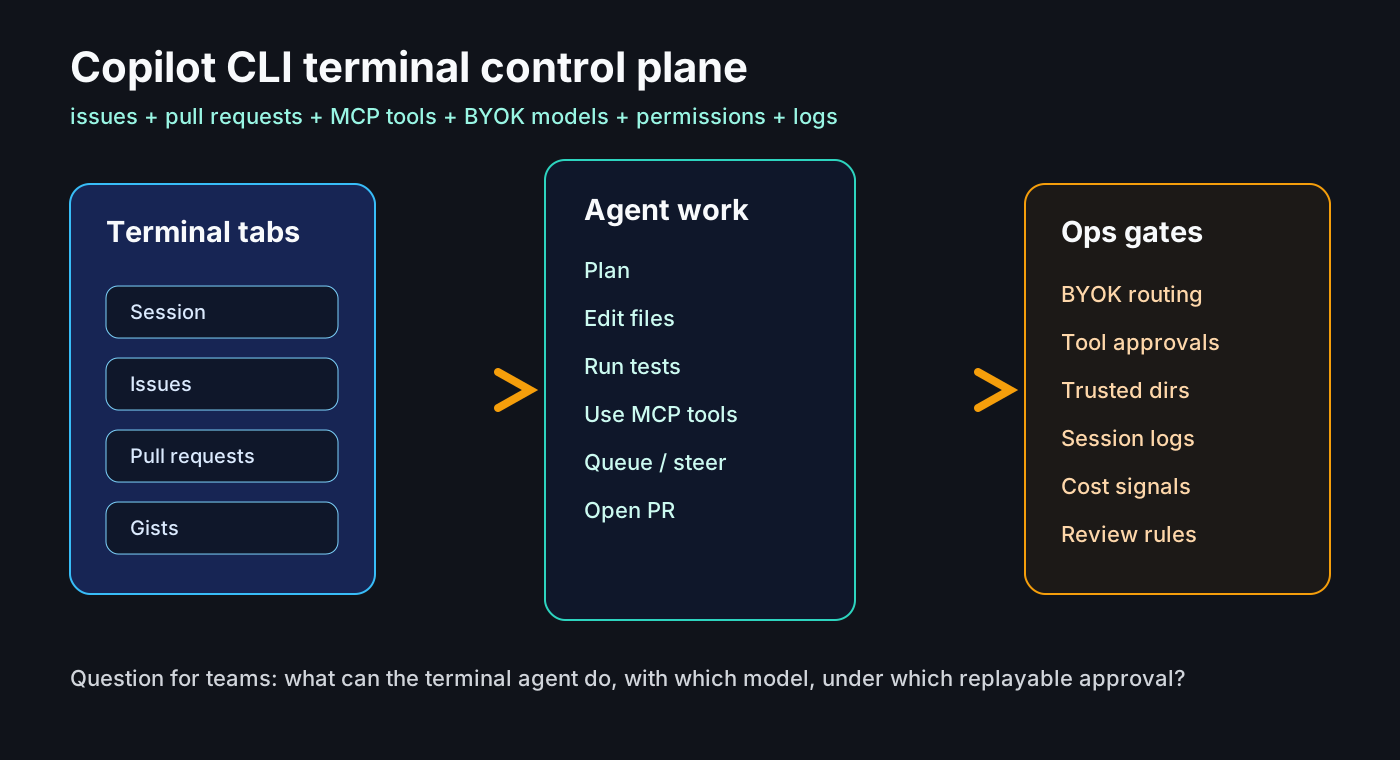
AI coding tools are moving from editor sidebars into the terminal. That is not just a new place to chat. The terminal is where builds run, tests fail, deployment scripts live, files are changed, secrets leak, and GitHub issues become pull requests. Once an agent operates there, teams need an operating contract before they need another prompt guide.
What happened
On June 23, 2026, GitHub made the redesigned terminal interface for Copilot CLI generally available. The changelog describes a tabbed layout for working with GitHub from the terminal, guided configuration for tools, and accessibility improvements. Inside a GitHub repository, the session can show Issues and Pull requests tabs, and selected items can be inserted into the prompt as references.
The same day, GitHub announced BYOK support for the GitHub Copilot app. Teams can add providers such as OpenAI, Azure OpenAI, Microsoft Foundry, Anthropic, LM Studio, Ollama, or an OpenAI-compatible endpoint, then choose a model for each session. GitHub says keys are stored in the local OS keychain and are not read back by the UI.
The June 22 update is part of the same pattern. Copilot CLI sessions can now accept follow-up messages while a request is still running: queue the message, steer the current request after the active tool finishes, or stop and send immediately. JetBrains also gained organization and enterprise agents, an agent debug logs summary view, and a Claude agent provider preview. On June 17, GitHub added enterprise BYOK models to the CLI /model picker.
Why this matters to working developers
A terminal agent has a much wider permission surface than autocomplete. Autocomplete suggests the next line. A CLI agent can read a repository, run tests, call sed, node, chmod, or rm, operate against issues and pull requests, and keep moving through a task. Accuracy matters, but operational boundaries matter more.
GitHub Docs state that Copilot CLI asks whether a directory is trusted and asks for approval before using tools that can modify or execute files. That is an operating detail, not just onboarding copy. Teams need to decide which directories are trusted, which tools can be approved for a whole session, and which commands should always require human review.
The new tab UI is also more than navigation. When issues and pull requests become native context in the terminal, the path from requirement to code change to test run to PR comment can sit in one execution surface. Used well, that reduces context switching. Used carelessly, it can concentrate unreviewed changes, long-running tasks, and opaque model spend in one place.
Community signal
Developer discussion is split between usefulness and fatigue. On Reddit, users point out that Copilot CLI can run inside the VS Code terminal, which means terminal agents can cut across editor choices. The same threads also show exhaustion with how quickly AI developer tools are changing.
A Hacker News discussion about Copilot billing highlights a different anxiety: shell compatibility, autocomplete behavior, comparison with other agent harnesses, and whether external providers such as OpenRouter can be part of the workflow. These community posts are not factual sources for product claims, but they are useful signals about what practitioners are worried about.
The pattern is clear: the competitive axis is shifting from a nicer chat box to operational control. Model choice, BYOK, log summaries, permission gates, MCP configuration, and mid-session steering all point in the same direction. The more agents do real work, the more developers want low friction and high control at the same time.
Development and operations impact
The first impact is model routing. With BYOK in the Copilot app and CLI-related flows, teams can think beyond one GitHub-hosted model. A frontier model might handle design review, a local model might handle mechanical edits, and a tenant-bound gateway might handle regulated code or data. That flexibility is useful only if routing rules are documented.
The second impact is permission policy. The CLI approval flow lets users allow, deny, or sometimes approve a tool for the rest of the current session. That can be productive for low-risk commands and dangerous for destructive or deployment-related commands. A team rule such as “test commands can be session-approved, deploy and database writes cannot” is more valuable than a generic AI usage policy.
The third impact is observability. Agent debug summaries and the command reference sections for logging, monitoring, and permissions show that CLI agents are becoming debuggable execution systems. After an incident, teams should be able to reconstruct the prompt, file context, model provider, tool approvals, command output, and cost signals. Without that trail, a terminal agent is hard to operate.
Terminal Agent Operating Contract
• 1. Define trusted directory rules before enabling Copilot CLI broadly. A monorepo root, home directory, and deployment folder should not be treated the same way.
• 2. Classify tool approvals. Read-only commands, test runs, package installs, file deletion, deployments, database writes, and email sends deserve different treatment.
• 3. Treat BYOK as data-boundary design, not just model variety. Record provider retention terms, regions, quotas, fallback behavior, and billing ownership.
• 4. Review MCP servers and plugins like dependencies. Capture source, permissions, network access, and update policy in pull requests.
• 5. Watch logs and cost at the team level. A personal assistant becomes an operations event when it creates pull requests, runs tests, or calls APIs.
A practical checklist
1. Define trusted directory rules before enabling Copilot CLI broadly. A monorepo root, home directory, and deployment folder should not be treated the same way.
2. Classify tool approvals. Read-only commands, test runs, package installs, file deletion, deployments, database writes, and email sends deserve different treatment.
3. Treat BYOK as data-boundary design, not just model variety. Record provider retention terms, regions, quotas, fallback behavior, and billing ownership.
4. Review MCP servers and plugins like dependencies. Capture source, permissions, network access, and update policy in pull requests.
5. Watch logs and cost at the team level. A personal assistant becomes an operations event when it creates pull requests, runs tests, or calls APIs.
6. Use queue and steering for long tasks, but make sure follow-up messages cannot silently expand the approved scope.
7. Start with a small evaluation: bug fix, test run, and PR description. Measure success rate, review time, failure modes, and spend before expanding.
Risks and counterarguments
The first risk is approval fatigue. If every action asks for permission, people learn to approve blindly. If approvals are too broad, the agent can change more than expected. The right balance is a team policy problem, not a product default problem.
The second risk is cost visibility. BYOK means spend may happen outside the GitHub bill. Provider quotas, token costs, local GPU usage, and retries need to be visible together, or model choice becomes cost fragmentation.
A fair counterargument is that many developers already have Copilot Chat in the IDE. Not every team needs to move to a CLI-first workflow. But infrastructure, backend, DevOps, and migration work often ends in the terminal. In those domains, a terminal agent has the most natural context and the most dangerous permissions.
Bottom line
The point of this release is not that Copilot CLI has a nicer interface. It is that GitHub issues, pull requests, MCP tools, BYOK models, permissions, logs, and cost signals are converging in the terminal. The question for engineering teams is less “which AI tool should we use?” and more “which tasks can run under which model, with which permissions, and what can we replay when something goes wrong?”
Sources
- GitHub Changelog: Copilot CLI new terminal interface is generally available
- GitHub Changelog: GitHub Copilot app support for BYOK
- GitHub Changelog: queue and steer messages, debug logs, JetBrains agent updates
- GitHub Changelog: Copilot CLI supports enterprise BYOK models
- GitHub Docs: Using GitHub Copilot CLI
- GitHub Docs: Copilot CLI command reference
- Hacker News discussion: Copilot usage-based billing and developer concerns
- Reddit r/GitHubCopilot discussion: CLI as terminal-native agent surface