
Copilot managed-settings.json is GA: AI coding tools now need policy as code
The biggest operational risk in AI coding tools is not that a model sometimes writes bad code. It is that every developer can end up with different plugins, different auto-approval habits, different MCP servers, and different model defaults while the organization has no reliable way to inspect or enforce the boundary. GitHub’s July 1, 2026 GA of Copilot managed-settings.json addresses exactly that problem.
What happened
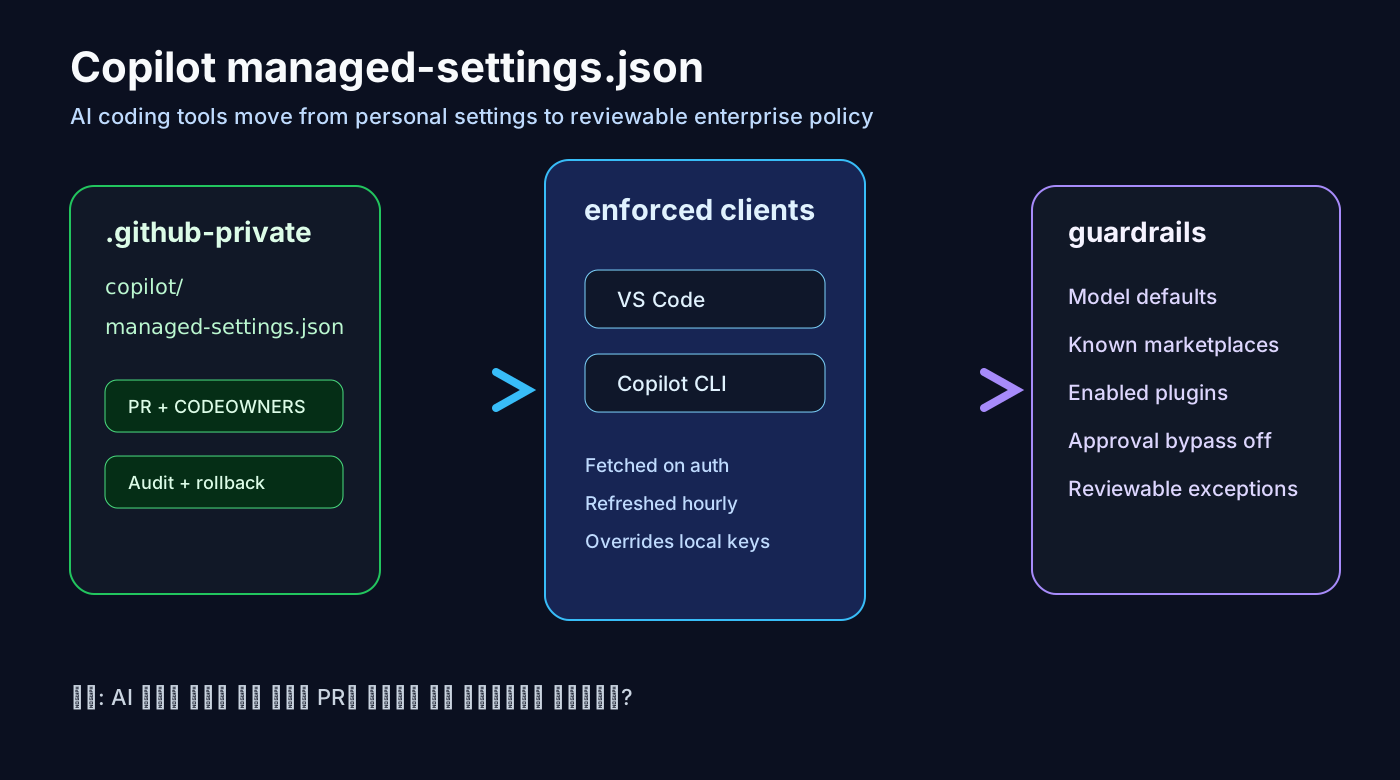
GitHub Enterprise Cloud customers can now keep copilot/managed-settings.json in a selected organization’s .github-private repository and centrally manage Copilot client configuration. According to GitHub’s changelog, this file adds governance and extensibility controls on top of the AI Controls tab in enterprise settings.
For supported keys, managed-settings.json takes precedence over configuration users set locally in their clients. The configuration is fetched when a user authenticates, stored in memory, and refreshed hourly. The supported clients today are VS Code and Copilot CLI for users licensed through Copilot Business or Copilot Enterprise by the enterprise or one of its organizations.
The currently listed keys are extraKnownMarketplaces, enabledPlugins, strictKnownMarketplaces, disableBypassPermissionsMode, and model. That list is small, but it covers the core operating surface: where tools come from, what is installed by default, whether untrusted marketplaces are blocked, whether approval bypass can be disabled, and what model default starts a conversation.
Why it matters for working developers
Teams adopting Copilot, Cursor, Claude Code, Codex, VS Code agent mode, and MCP servers quickly discover that model choice is not the first governance problem. The harder questions are operational: which marketplaces can developers trust, which tools may run without approval, whether external MCP servers are allowed, how model defaults affect cost, and who reviews changes to those decisions.
The important idea is that Copilot settings become code-reviewable policy. If the policy lives in .github-private, changes can have owners, pull requests, review history, rollback, and audit context. That is a much stronger operating model than telling every developer to copy settings from a wiki.
This matters more as coding assistants become agents. Autocomplete can suggest a bad line. An IDE or CLI agent can edit files, run commands, fetch URLs, call APIs, and delegate work. For that class of tool, organizations need permission, marketplace, approval, telemetry, and network boundaries before they need another model benchmark spreadsheet.
Community signal
The GitHub Community discussion around enterprise managed settings frames this as configuration as code for governance and extensibility. GitHub staff describe goals such as cross-client standardization, visible guardrails that users can understand, and faster onboarding for new users or specific jobs to be done.
That signal is useful because it matches what platform teams are already asking for. They do not only want “more capable AI.” They want the ability to distribute trusted tools, block risky ones, and make policy visible when a client refuses an action.
Community posts should not be treated as the factual source of the feature. The confirmed details come from the GitHub changelog, GitHub Docs, and VS Code Docs. The community signal is about what practitioners are worried about: central control, portability of settings, and safe extensibility.
Operational impact
The first impact is marketplace governance. strictKnownMarketplaces lets an enterprise restrict plugin installation to explicitly defined marketplaces. GitHub positions this as a way to reduce the risk of users installing untrusted plugins before tool execution even begins.
The second impact is approval governance. disableBypassPermissionsMode can prevent Copilot CLI and VS Code users from skipping permission prompts through bypass or auto-approve behavior. VS Code’s enterprise AI documentation makes the same point from the IDE side: agent tools can modify files, run commands, and access external services, so organizations may need stricter approvals.
The third impact is default model governance. The model key lets enterprises set a default model, and a related GitHub changelog says enterprises can default new conversations to auto. Teams should treat that as an operating default, not a personal taste setting: cost, latency, quality, and sensitive workload rules should be explicit.
The fourth impact is onboarding. Enterprise plugin standards can define known marketplaces and default-enabled plugins so new users receive standard capabilities when they authenticate. For platform teams, that turns agent distribution into a versioned policy file rather than a wiki checklist.
A practical checklist
1. Choose the source organization and owners for .github-private; include security, platform, DevEx, infrastructure, and application representatives.
2. Treat copilot/managed-settings.json as AI policy code with CODEOWNERS, pull requests, review reasons, and rollback instructions.
3. Start from a deny-by-default marketplace posture. For every allowed marketplace, document the owner, review cadence, and plugin update policy.
4. Keep approval bypass disabled at first, especially for terminal commands, file writes, network fetches, database access, deployments, and email-sending tools.
5. Define model defaults by workload, not only by price. Security-sensitive code, large refactors, tests, and documentation may deserve different defaults.
6. Reconcile GitHub policy with VS Code enterprise policy. MCP registry, tool approvals, network filtering, and telemetry capture can span both layers.
7. Test enforcement with a pilot group: fresh login, hourly refresh, supported client versions, exception handling, and whether local overrides are blocked.
Risks and counterarguments
The first risk is surface coverage. General availability does not mean every Copilot surface enforces the same keys today. GitHub’s current statement names VS Code and Copilot CLI; teams should validate every other client before assuming parity.
The second risk is false confidence. A managed settings file does not review plugin code, validate MCP server behavior, scope tokens, filter network egress, or redact logs by itself. It gives you a control plane; it does not replace a security model.
The third counterargument is developer autonomy. Strict defaults can slow useful experimentation. The better pattern is not blanket prohibition. It is safe defaults plus a fast, reviewable exception path. Good AI governance should shorten the route to approved tools, not turn experimentation into shadow IT.
AI Coding Tool Policy Checklist
• 1. Choose the source organization and owners for .github-private; include security, platform, DevEx, infrastructure, and application representatives.
• 2. Treat copilot/managed-settings.json as AI policy code with CODEOWNERS, pull requests, review reasons, and rollback instructions.
• 3. Start from a deny-by-default marketplace posture. For every allowed marketplace, document the owner, review cadence, and plugin update policy.
• 4. Keep approval bypass disabled at first, especially for terminal commands, file writes, network fetches, database access, deployments, and email-sending tools.
• 5. Define model defaults by workload, not only by price. Security-sensitive code, large refactors, tests, and documentation may deserve different defaults.
• 6. Reconcile GitHub policy with VS Code enterprise policy. MCP registry, tool approvals, network filtering, and telemetry capture can span both layers.
• 7. Test enforcement with a pilot group: fresh login, hourly refresh, supported client versions, exception handling, and whether local overrides are blocked.
Bottom line
The practical takeaway is that AI coding tools are becoming organizational infrastructure. When evaluating an agent or assistant stack, ask less “which model is smartest?” and more “can model defaults, plugins, MCP access, approvals, network rules, and telemetry be reviewed in Git and enforced in the clients developers actually use?”
Sources
- GitHub Changelog: Enterprise managed-settings.json is generally available
- GitHub Docs: Configuring enterprise managed settings
- GitHub Changelog: strictKnownMarketplaces support
- GitHub Changelog: disableBypassPermissionsMode support
- VS Code Docs: Manage AI settings in enterprise environments
- GitHub Docs: About enterprise-managed plugin standards
- GitHub Community: Enterprise-managed settings discussion