
Next.js 16.3 Instant Navigations: the cache contract matters more than the fast click
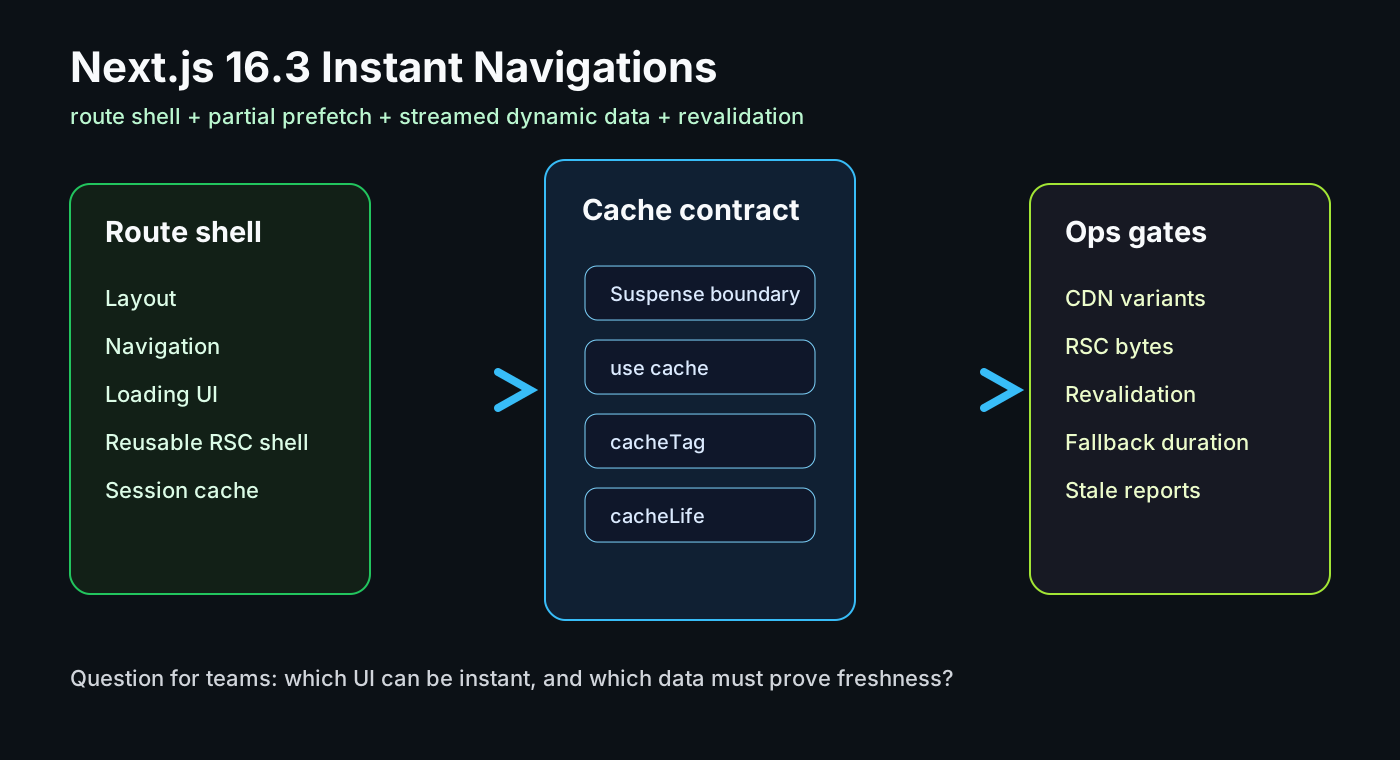
The most repeated complaint about the Next.js App Router has not been that server-centric rendering is wrong. It has been that navigation can feel less immediate than a client-side SPA. Next.js 16.3 Preview tackles that directly with Instant Navigations. The practical story, however, is not a faster animation. It is deciding which parts of a route can become an instant shell, which data must stream later, and how those cached pieces stay correct.
What happened
On June 24, 2026, the Next.js team published the 16.3 Preview. The release introduces a set of tools around Instant Navigations: the ability to make a navigation feel immediate by streaming or caching the right parts, and the ability to opt out when blocking behavior is required.
Partial Prefetching is the most important piece. Instead of prefetching every visible link as a full page, Next.js can prefetch a reusable shell for each distinct route and cache that shell throughout the session. A Chat route and a Settings route can each have one reusable shell; when the user clicks, that shell renders immediately and the remaining server component payload streams in.
This fits into the broader Cache Components model from Next.js 16. With cacheComponents: true, Partial Prerendering becomes the default behavior in the App Router, and developers opt specific functions or components into caching with tools such as use cache, cacheLife, and cacheTag. The important question shifts from “is this page static or dynamic?” to “which parts of this route are cacheable, which parts are request-bound, and how are they invalidated?”
Why this matters to working developers
Instant Navigations affect product feel, not just benchmark charts. Users do not distinguish a slow API from a blank click transition. If the route shell appears immediately while slower content streams in, the same backend latency can feel more responsive. That matters for dashboards, commerce flows, documentation, and SaaS settings screens where users move between routes repeatedly.
The benefit is not automatic. The Cache Components documentation makes a strong rule visible: data that cannot complete during prerendering must be handled explicitly, often with <Suspense> or use cache. That constraint is useful because it forces teams to separate the initial shell from request-time UI. Without that separation, Instant Navigations can expose stale data, poor fallbacks, or unnecessary server work instead of improving perceived speed.
The second shift is how teams interpret network activity. The Next.js 16 upgrade guide explains that routing and navigation changed how prefetch and cache data are optimized, and that apps may see more individual prefetch requests while total transfer size goes down. With 16.3, request count alone is the wrong metric. Teams should look at transferred bytes, shell reuse, RSC chunk timing, cache hit ratio, and interaction latency together.
Community signal
The community has been asking for this for a while. In Next.js discussions on Reddit, developers trying to make App Router navigation feel as smooth as Nuxt or an SPA often end up talking about Link prefetching, Suspense, and Partial Prerendering. That is the real tension: developers want the framework to feel instant, but the app’s data boundaries still matter.
GitHub discussions around PPR and stale searchParams show another signal. They should not be treated as standalone product facts, but they reveal where teams get confused: query-driven UI, PPR cache entries, and freshness expectations. For 16.3 to work well in production, cache boundaries and invalidation rules need to be explainable patterns, not just launch-demo magic.
The demand is reasonable. Developers want clicks to feel immediate without showing wrong data. They want prefetching to help without burning mobile bandwidth or server budget. They want server components and streaming without losing debuggability. Instant Navigations are a framework-level attempt to make that balance easier to design.
Development and operations impact
The first impact is route design. Teams can no longer think only in page-level static, dynamic, and ISR categories. A route now has a shell, Suspense boundaries, cached functions, dynamic components, and streamed payloads. A fast navigation requires a stable shell, and that shell needs to contain something useful enough to show immediately after a click.
The second impact is CDN architecture. The Next.js CDN Caching guide explains how PPR-enabled static prefetch responses can be cached, why RSC variants matter, and why the platform direction is moving toward pathname-based cache keying. Teams self-hosting or deploying outside Vercel should verify that HTML, RSC responses, prefetch variants, and purge behavior all line up.
The third impact is freshness. revalidateTag, revalidatePath, cacheTag, and cacheLife are powerful but dangerous when used casually. Instant navigation does not hide stale data. It makes cached UI visible faster, which means incorrect cache policy becomes more visible too.
The fourth impact is observability. Navigation quality is hard to judge with one Lighthouse run. Teams should track click time, shell paint, streamed content arrival, fallback duration, RSC request bytes, CDN hit ratio, and revalidation events. For internal dashboards and admin tools, “time to meaningful shell after click” may be more useful than raw TTFB.
Instant Navigation Operating Checklist
• 1. Pick the five routes users navigate between most often. For each route, separate the instant shell from request-time regions.
• 2. Check build errors and dev warnings for uncached data outside <Suspense> or outside an explicit cache boundary.
• 3. Before disabling default Link prefetching, measure transferred bytes and shell reuse. Do not optimize against request count alone.
• 4. Use hover-triggered or manual router.prefetch() only on high-intent entry points such as pricing, checkout, settings, or editor routes.
• 5. Name cacheTag and cacheLife policies in domain language, such as product-list, viewer-permissions, or billing-summary, so ownership is clear.
A practical checklist
1. Pick the five routes users navigate between most often. For each route, separate the instant shell from request-time regions.
2. Check build errors and dev warnings for uncached data outside <Suspense> or outside an explicit cache boundary.
3. Before disabling default Link prefetching, measure transferred bytes and shell reuse. Do not optimize against request count alone.
4. Use hover-triggered or manual router.prefetch() only on high-intent entry points such as pricing, checkout, settings, or editor routes.
5. Name cacheTag and cacheLife policies in domain language, such as product-list, viewer-permissions, or billing-summary, so ownership is clear.
6. If you run your own CDN, confirm that HTML, RSC, prefetch variants, and on-demand purge share the same invalidation model.
7. Roll out by route, not by whole app. Watch fallback duration, stale-data reports, server render cost, and conversion paths together.
Risks and counterarguments
The first risk is preview maturity. The release is explicitly a Preview, and the Next.js team says a more polished stable release is expected later. That argues for measured pilots on documentation, dashboards, and read-heavy routes before pushing the pattern into checkout or billing-critical flows.
The second risk is over-prefetching. Partial Prefetching reduces wasteful page-level prefetching by default, but teams can still add aggressive manual prefetching and burn bandwidth or server work. The prefetching guide warns that custom Link behavior means owning cache invalidation and accessibility concerns.
A fair counterargument is that teams wanting SPA-like navigation can build a client-side app. For some products, that is the right call. But many teams want server components, streaming, SEO, and tighter data boundaries while still improving click feel. Next.js 16.3 is interesting because it moves toward that middle ground instead of pretending every route should be one rendering mode.
Bottom line
The useful takeaway from Next.js 16.3 is not “clicks are faster now.” It is that route shells, Suspense, Cache Components, prefetching, CDN behavior, and revalidation now need to be designed as one contract. When evaluating the preview, ask less “does the demo feel instant?” and more “which parts of our routes can safely become shells, and how do we keep the streamed data fresh?”
Sources
- Next.js Blog: Next.js 16.3 Instant Navigations
- Next.js Docs: Prefetching
- Next.js Docs: Caching with Cache Components
- Next.js Docs: cacheComponents configuration
- Next.js Docs: Version 16 upgrade guide
- Next.js Docs: Rendering Philosophy
- Next.js Docs: CDN Caching
- Next.js Docs: PPR Platform Guide
- GitHub Discussion: Next.js searchParams and PPR cache concerns
- Reddit r/nextjs discussion: smooth App Router navigation expectations