
Codex Sites and plugins: internal tools now need a deployment governance layer
Agent output is moving from “a demo I opened locally” to “a hosted thing my workspace can use.” OpenAI’s June 2, 2026 Codex update bundles three related changes: role-specific plugins, Sites preview, and annotations. For developers, the important part is not that Codex can generate more artifacts. It is that generated artifacts can become shared workspace URLs, which means they now sit inside the team’s deployment, permission, and review model.
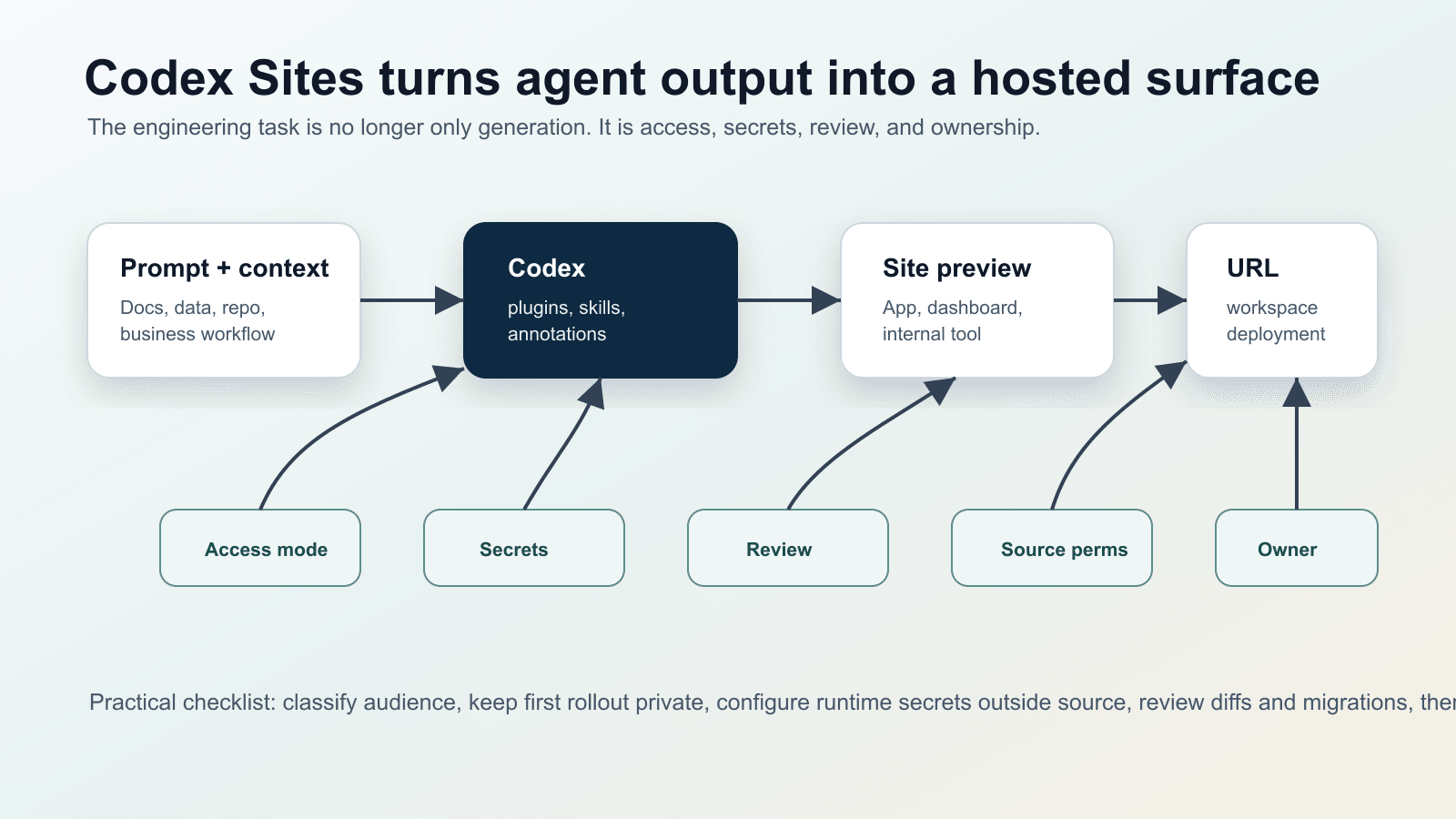
What changed
OpenAI’s announcement says Codex now supports plugins adapted to roles and tools, annotations for targeted refinement, and a preview of interactive hosted websites and apps that Business and Enterprise teams can share inside a workspace. The Codex changelog is more direct: Sites is available in preview in the Codex app, and the Sites plugin can create, save, deploy, and inspect websites, dashboards, internal tools, web apps, and games hosted by OpenAI.
The Sites documentation is where the engineering implications become concrete. Before widening access, OpenAI tells teams to set the audience, keep a new site limited to the owner and workspace admins until content and data handling are reviewed, configure runtime environment values and secrets through the Sites panel, and confirm the deployment status and production URL before sharing. That is deployment governance language, not just a product feature description.
Why it matters
The risk profile of AI coding tools used to be centered on bad diffs: generated code could be wrong, incomplete, or insecure. Sites adds another layer. A generated dashboard can become a live URL. A role plugin can connect Codex to business systems. An annotation can update one part of a document, slide, spreadsheet, or web UI without regenerating the rest. The unit of review is no longer only a pull request; it is the combination of source, data access, runtime secrets, audience, and owner.
The plugin help article reinforces the same boundary. Plugins can package skills, apps, and templates, but they do not grant new data access by themselves. Users still need access to the app in the workspace and permission in the underlying source system. That means teams need to audit the identity path: which person, which app, which source system permission, which generated output, and which hosted audience.
Community signal
Developer discussion around Codex Sites shows both enthusiasm and anxiety. Some users read Sites as the end of the “here is my localhost demo” joke: agent-built apps can now become persistent, shareable artifacts. Others immediately ask what happens when people who do not understand servers, networks, or data boundaries start hosting internal web apps. I am treating these threads as audience signals, not factual sources. The factual claims here come from OpenAI’s announcement and docs.
Operational impact
- Prototype boundaries get weaker. A URL travels faster than a local branch or a screenshot, so drafts can become de facto tools.
- Review expands beyond code. Teams need to review source changes, plugin permissions, source-system access, runtime secrets, and audience settings together.
- Secrets become part of the product surface. Environment values must live in the hosting control plane, not in generated files.
- Non-developer output becomes an engineering concern. A dashboard created by an analyst may still expose data, create dependencies, and need retirement.
Practical checklist
- Classify every Site as personal draft, team-internal, company-wide, or external-facing candidate.
- Keep first deployments owner/admin only; widen access after content, data handling, and owner review.
- Create a plugin matrix: read-only apps, write-capable apps, confirmation-required actions, and forbidden actions.
- Scan generated source for secrets and move runtime values into the Sites panel before deployment.
- Test with a low-privilege user to confirm the Site does not bypass source-system permissions.
- Record owner, data sources, expiry date, and last review date for every hosted internal tool.
Risks and counterarguments
The main risk is treating Sites as a fast publish button. Internal tools often look harmless until they connect to customer data, financial models, operational metrics, or internal documents. The second risk is lifecycle drift: a “temporary” generated app keeps being used after its owner leaves, its dependencies age, or its audience becomes too broad.
Blocking all hosted agent output is not realistic either. A launch hub, customer review dashboard, planning board, or scenario planner may be too small for a full product team but too interactive for a document. The right answer is classification. Some Sites should remain drafts, some need a security review, and some should graduate into normal product deployment practices.
Bottom line
Codex Sites and plugins are not just another “AI writes code” story. They move agent output into a hosted, shareable layer of work. That gives developers a new responsibility: define how agent-created internal tools are approved, secured, reviewed, owned, and retired before the organization starts depending on them by accident.