
GitHub Projects advanced search is GA: your board is not an audit log
“When did this change reach production, who approved it, and why did its first deployment fail?” If one GitHub Projects board is expected to answer that question next quarter, revisit the data model. On July 16, GitHub made advanced Projects search generally available with AND, OR, and reviews:. In the same changelog, GitHub announced that deployment statuses older than 90 days are automatically deleted and disappear from the REST and GraphQL APIs. The board became a better control surface, not a durable audit ledger.
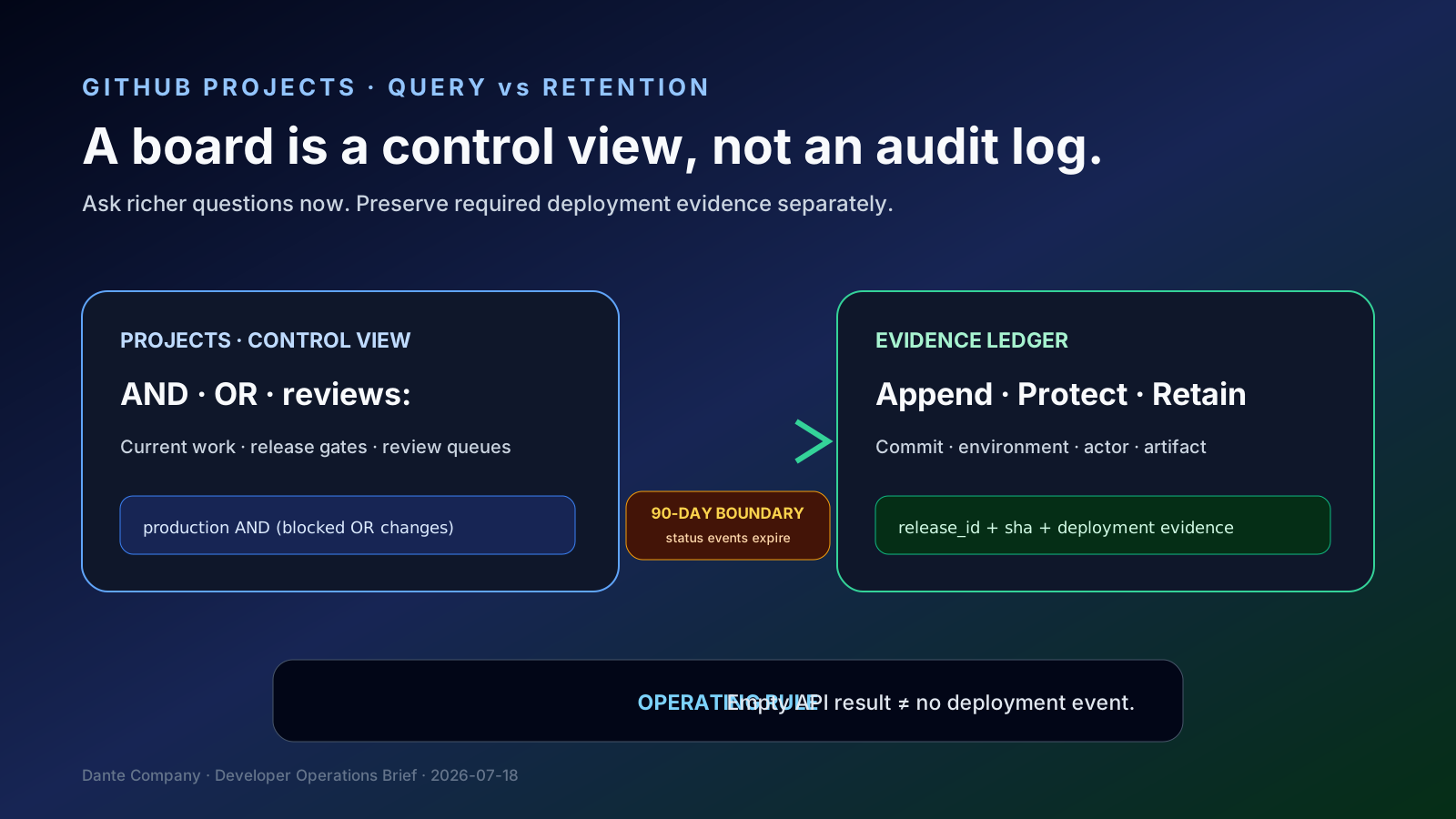
What changed: richer questions, shorter-lived history
Projects filter bars can now express logical AND and OR across a query instead of requiring a separate saved view for each question. Teams can keep recurring operational views while using ad hoc expressions for release meetings and investigations.
The new reviews: filter brings PR review state into project queries. It is backed by the Reviewers field, which tracks requested reviewers and each reviewer’s latest submitted review. Review completion no longer has to be collapsed into a generic workflow status.
The retention change is the critical boundary: deployment statuses older than 90 days are deleted and no longer appear in REST or GraphQL. A deployment’s current state remains, but an older sequence such as queued → in_progress → failure → success cannot be assumed to remain queryable.
Why it matters: current state, workflow, and evidence are different data
Projects is optimized for “what should we do now?” It projects issues, PRs, reviews, and fields into a current operational view. Deployment statuses are event-like records showing how a deployment moved through time. Linking them in one interface does not give them the same lifetime or responsibility.
A surviving current state cannot reconstruct retry count, the first failure, or the time between approval and a verified production release. API consumers that interpret an exhaustive paginated response as complete history may mistake expired data for “nothing happened.”
Incident reviews, customer support, rollback decisions, and internal delivery metrics may need evidence beyond 90 days even without formal compliance. The point is not that GitHub’s retention is wrong; it is that product retention and your evidence requirement may differ.
Design pattern: Projects as control view, external store as evidence ledger
Keep decision-facing fields in Projects: environment, release, risk, review state, deployment state, and incident link. Use advanced queries to find production-bound PRs lacking approval or work associated with failed and rolled-back deployments.
At deployment time, write a minimal, append-oriented record through Actions or the deployment platform. Useful fields include repository, commit SHA, environment, deployment ID, status, actor or approver, workflow URL, artifact digest, and timestamp. Preserve verifiable identifiers and required evidence rather than copying every sensitive log.
Link the Projects item to a release ID or evidence URL instead of duplicating the ledger. The board stays fast and current; the ledger reconstructs history. Each layer can then have an appropriate schema, access policy, and retention period.
Turn search expressions into operating rules
Translate recurring questions into testable queries. Expressions such as environment:production AND (reviews:changes_requested OR status:blocked) illustrate the intent, while actual qualifiers and review values should be confirmed against your project fields and GitHub’s UI suggestions.
Save views for repeated responsibilities such as daily triage, release gates, and incident follow-up. Use ad hoc advanced search for one-off analysis. Name each saved view for the owner and expected action, not merely the data it displays.
If an integration collects deployment statuses, monitor its last successful sync, lag, per-deployment status count, and a sync interval comfortably inside the 90-day source boundary. Never convert an empty API result directly into “zero failures” without checking retention and collection health.
Community signal: when is work actually done?
Practitioners continue to ask how to group project work by deployment, hide completed items, and later reconstruct a release. Suggestions range from milestones to additional workflow columns. These discussions are audience signals, not product documentation: they reveal uncertainty over whether Done means merged, tested, deployed, or production-verified.
Advanced search cannot repair an undefined state model. AND and OR only become useful when review, deployment, and validation are represented as distinct fields or events.
Agree on the completion model first. Treat code complete, review approved, deployment successful, and production validated as connected but separate events. Then the board and evidence ledger can each do one job well.
Practical checklist
1. Document the repeated question and owner behind each saved Projects view.
2. Test Reviewers and reviews: on PR items.
3. Build a release-gate query with AND and OR, then manually validate a sample.
4. Separate merged, deployed, and production-validated definitions of Done.
5. Identify reports and incident procedures that need deployment history beyond 90 days.
6. Export required status events before the source retention window closes.
7. Preserve commit SHA, environment, deployment ID, actor, workflow URL, and artifact digest.
8. Define ledger access, encryption, retention, and deletion.
9. Distinguish “no event” from “event expired” in API consumers.
10. Reconstruct one old deployment during a quarterly recovery drill.
Risks and counterarguments
An external ledger adds cost, security scope, and privacy responsibility. Not every team needs one. If all analysis fits inside 90 days and the deployment provider already retains adequate evidence, duplicating GitHub status events may add little value. Start with the questions and obligations.
GA search does not make every field model correct. Complex expressions can hide missing values and incorrect qualifiers. Enforce critical release gates with CI and environment protection rules, not only a UI view.
Deployment statuses, workflow logs, audit logs, and artifact provenance prove different things. Avoid “store everything.” Preserve the minimum evidence required to reconstruct and verify the decisions your team actually needs.
Example operational query
# Example intent — confirm exact field names in your Project
(environment:production AND reviews:changes_requested)
OR (environment:production AND status:blocked)

# Evidence collector must run inside the source-retention window
repository + commit_sha + environment + deployment_id
+ status + actor + workflow_url + artifact_digest + created_at
Field names and accepted review values depend on the Project configuration; validate the expression against a known sample before using it as a gate.
Projects and deployment evidence checkpoint
✓Document the repeated question and owner behind each saved Projects view.
✓Test Reviewers and reviews: on PR items.
✓Build a release-gate query with AND and OR, then manually validate a sample.
✓Separate merged, deployed, and production-validated definitions of Done.
✓Identify reports and incident procedures that need deployment history beyond 90 days.
✓Export required status events before the source retention window closes.
✓Preserve commit SHA, environment, deployment ID, actor, workflow URL, and artifact digest.
✓Define ledger access, encryption, retention, and deletion.
✓Distinguish “no event” from “event expired” in API consumers.
✓Reconstruct one old deployment during a quarterly recovery drill.
Bottom line
GitHub Projects AND, OR, and reviews: improve how teams ask questions about current work. Once deployment statuses expire after 90 days, however, that board cannot serve as a durable audit ledger. Use Projects as the control view, retain required evidence separately, and connect the two with release IDs and commit SHAs.