
MCP Apps changes agent UX: tool output is becoming a product surface
When teams try to use AI agents for real work, the first hard limit is often not model quality. It is interface shape. A log-analysis tool returns a long summary when the operator needs a sortable timeline. A deployment assistant explains options when the release manager needs a form with safe defaults. A document-review agent lists clauses when the reviewer needs to click, approve, reject and leave structured notes.
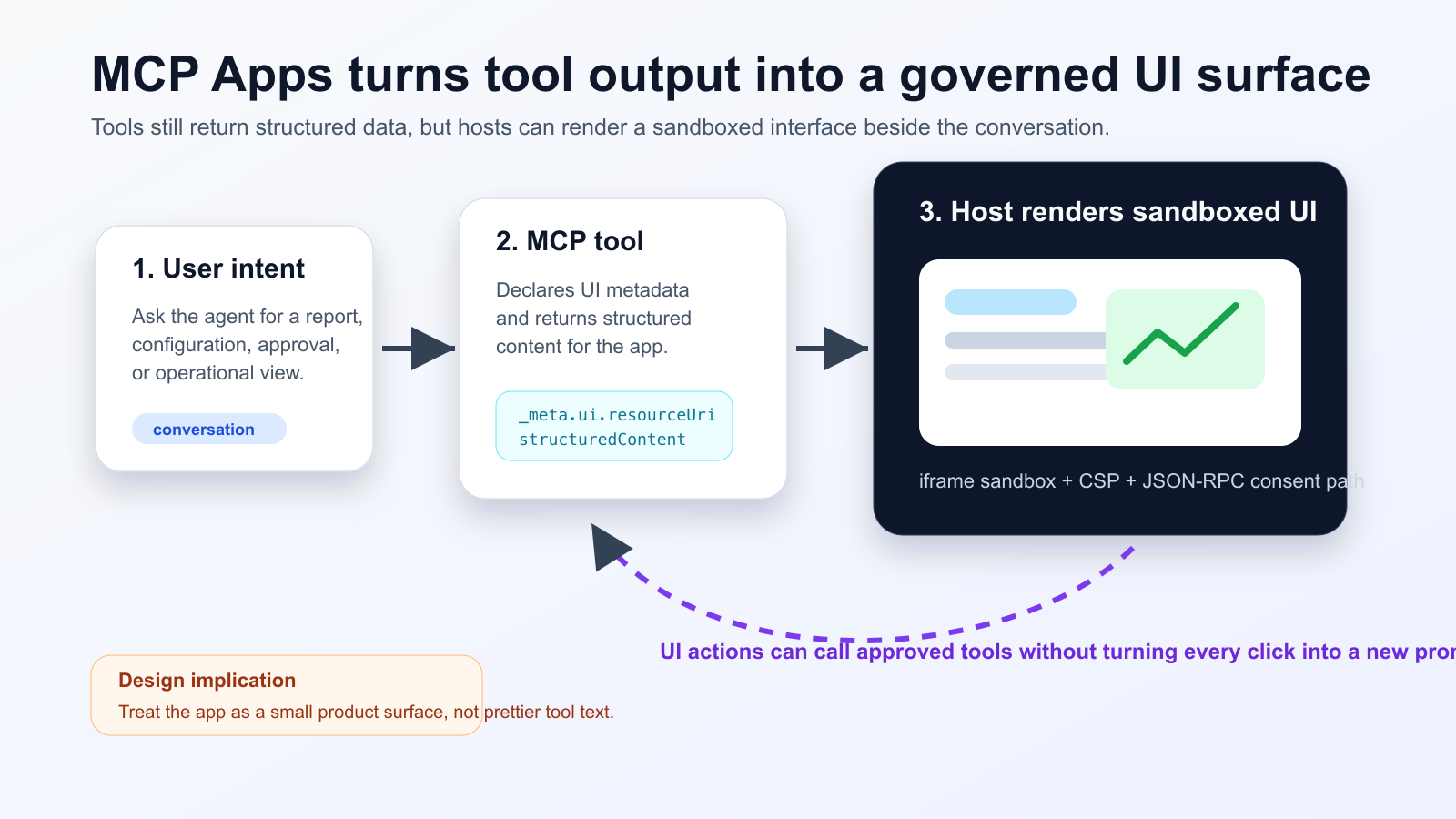
MCP Apps addresses that gap directly. The Model Context Protocol documentation describes MCP Apps as an extension that lets servers return interactive HTML interfaces that render inside the chat, instead of forcing every result through plain text. A tool declares a UI resource, the host renders it in a sandboxed iframe, and the app communicates with the host through JSON-RPC-style messages so follow-up tool calls, user consent and host capabilities can remain governed.
What changed
The important shift is not one single product launch. It is the convergence of a protocol extension, framework support and enterprise host support. SEP-1865, MCP Apps - Interactive User Interfaces for MCP, is listed as Final in the MCP SEP index. The official MCP docs and blog frame the use cases around data exploration, configuration wizards, document review and real-time monitoring: workflows where text-only responses force users into repeated prompt loops.
On May 19, 2026, Vercel announced that Nuxt MCP Toolkit now supports MCP Apps. Developers can author Vue SFCs under app/mcp/, declare a tool with defineMcpApp, read pre-hydrated data, and trigger follow-up prompts or tool calls through useMcpApp. Microsoft’s documentation points in the same direction for declarative agents: interactive UI widgets can be attached to MCP server-based actions, but the implementation must satisfy widget host, CORS and authentication requirements.
Why developers should care
MCP Apps is not just a prettier rendering layer. It changes the contract of an agent tool. A traditional MCP tool primarily returns content the model can read and summarize. An MCP App splits the experience: the model can receive a concise, structured result while the human receives an interactive surface for exploration and action. That distinction matters because not all information should be pushed into the model context window, and not every user decision should be converted into another natural-language prompt.
For product engineers, this makes agent tooling feel much closer to application design. Empty states, loading states, accessibility, keyboard navigation, responsive layout, destructive-action confirmation and error recovery all matter again. For platform engineers, it adds operational concerns: if a widget can request additional tool calls, then UI interactions become auditable backend events. The system needs rate limits, permission checks, consent records and traceability across the original model turn and later UI actions.
Community signal: interest is real, but deployment is uneven
The developer conversation is still early. A recent Reddit thread asked why MCP Apps have not spread as visibly as MCP itself or Skills. A Microsoft Q&A thread shows a more concrete failure mode: a widget renders in MCP Inspector but only text appears in Microsoft 365 Copilot Chat. Those posts are not factual authorities, but they are useful practitioner signals. Builders want richer agent interfaces, yet they are running into host support, metadata, CORS, authentication, widget renderer domains and packaging details.
That is the right lens for June 2026. MCP Apps is not a guarantee that every chat client is suddenly an app platform. It is a credible standardization path for the places where agent tools are becoming product surfaces.
Operational impact
Decisions to make before adopting MCP Apps
- Separate summaries intended for the model from detailed data intended only for the UI.
- Treat UI resources as versioned artifacts with bundle-size, load-time and compatibility budgets.
- Classify every UI action as read-only, state-changing or destructive, then attach consent and audit requirements accordingly.
- Document host differences across Claude, ChatGPT, Microsoft 365 Copilot, VS Code-family clients and local inspectors.
- Validate against the production host, not only MCP Inspector, because CORS, OAuth redirect URIs and iframe policies differ by host.
The most promising use cases are the ones where users currently spend prompts navigating data: incident timelines, release approvals, billing dashboards, CRM record review, security triage, document workflows and configuration panels. In those workflows, an interactive table or form can remove several model turns and make the user’s decision more explicit.
The weak use cases are simple answers and one-off summaries. If the user only needs to read a short result, an MCP App adds build and maintenance cost without improving the job. There is also a subtle model-context risk: if all important detail lives only in the UI, the model may lose the basis for follow-up reasoning. The tool should still return a compact textual or structured summary that the model can reference responsibly.
Engineering checklist
- Schema first: stabilize tool input and output schemas before building the UI.
- Permission model: separate read-only interactions from actions that mutate external systems. State changes need explicit consent, logs and retry behavior.
- Security: test iframe sandboxing, CSP, allowed origins and OAuth redirect URIs in the actual host environment.
- Accessibility: interactive agent UI still needs labels, keyboard support, useful empty states and text alternatives for visualizations.
- Observability: connect tool calls, UI events, consent prompts and failure reasons in one trace.
- Compatibility: use MCP Inspector as a baseline, then test real hosts separately.
Risks and counterarguments
The first risk is moving implementation ground. SEP-1865 is Final, but host support and SDK ergonomics will continue to vary. The second risk is security. A UI that can request tool calls is not just display output; it is an action surface. Users may trust it more because it appears inside a familiar agent conversation, so confirmation, logging and permission boundaries become more important, not less.
The third risk is product sprawl. MCP Apps can create impressive demos quickly, but every widget becomes another frontend to maintain. Design systems, localization, browser behavior, dependency updates and security reviews do not disappear because the UI is embedded in chat. Start with workflows where text round-trips are obviously expensive and where the action model is easy to audit.
Bottom line
MCP Apps is best understood as a broader output contract for agent tools. Good tools now need to serve two audiences at once: the model, which needs compact structured context, and the human, who needs a safe interactive surface. Teams should not rush to convert every MCP tool into an app. They should pick one internal workflow such as deployment approval, cost review or incident triage, then measure whether the UI reduces prompt loops without creating unacceptable security and operations overhead.
Sources
- Model Context Protocol Blog: MCP Apps - Bringing UI Capabilities To MCP Clients
- Model Context Protocol Docs: MCP Apps overview
- Model Context Protocol SEPs index: SEP-1865 status
- Vercel Changelog: Nuxt MCP Toolkit now supports MCP apps
- Nuxt MCP Toolkit documentation
- Microsoft Learn: Add interactive UI widgets to declarative agents
- Microsoft Q&A: MCP Apps UI does not render in Copilot 365 Chat, used as practitioner signal
- Reddit r/ClaudeAI thread on MCP Apps traction, used as community signal