
Vercel Functions now run for 30 minutes: what to decide before moving long AI work into serverless
Function timeouts have always shaped serverless architecture more than teams admit. The moment an LLM response streams for minutes, a PDF needs OCR, or a browser automation task touches several pages, the real design question appears: should this stay inside an API route, move to a queue, or run somewhere with a real workspace?
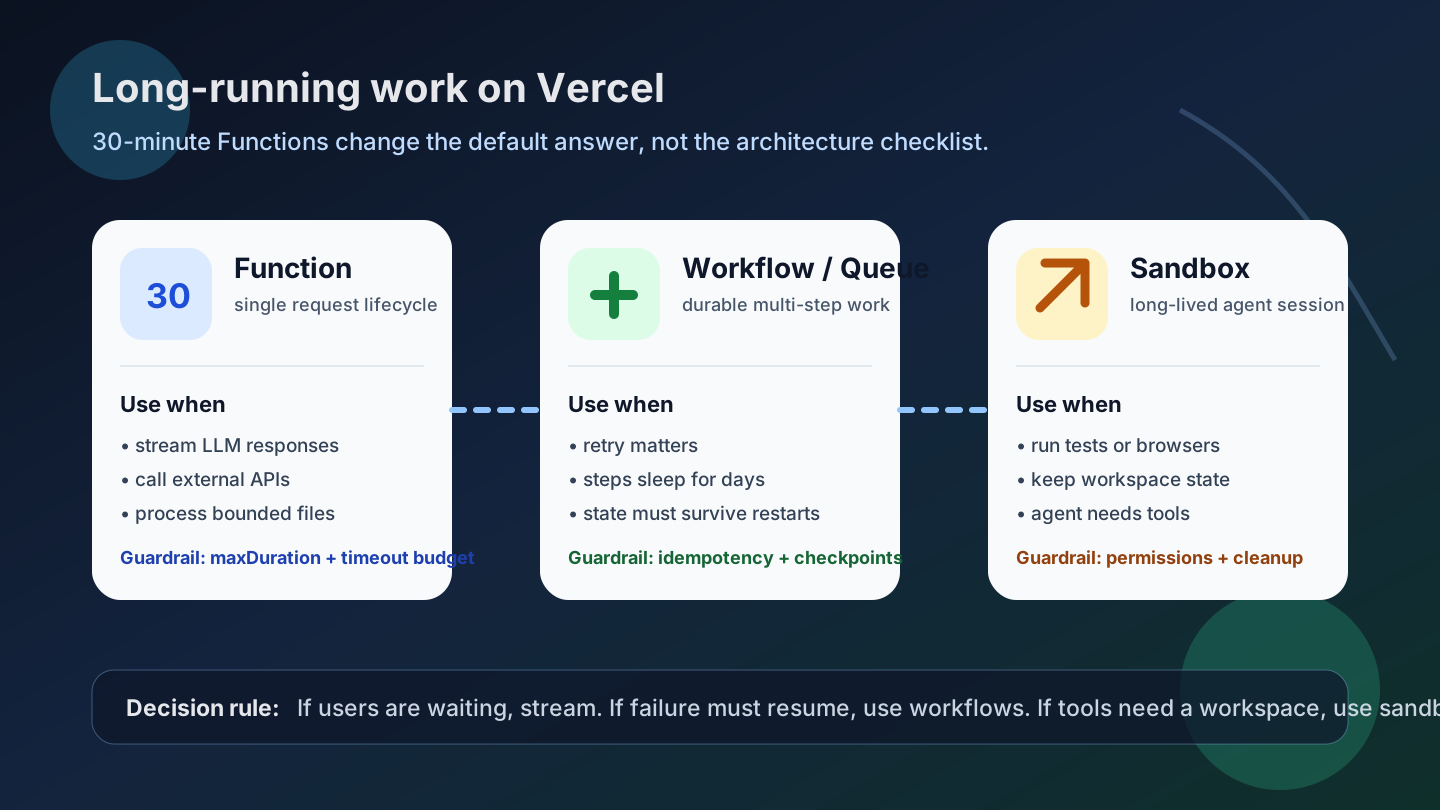
On June 15, 2026, Vercel announced that Vercel Functions using the Node.js and Python runtimes can now run for up to 30 minutes on Pro and Enterprise teams. Vercel also says durations above 800 seconds are in beta and require Fluid Compute. That is a meaningful shift, but it is not permission to put every long task into one request. It makes the runtime choice more explicit: Function, Workflow, Queue, or Sandbox.
What changed
The official change is narrow and useful. Vercel lists long LLM reasoning and tool calls, multi-minute AI streaming responses, document and media processing, OCR and extraction, web scraping and browser automation, and complex Workflow steps or Queue handlers as examples of work that can benefit from longer Functions.
For a Next.js App Router route, opting in is as direct as setting maxDuration in the route file. Other frameworks and runtimes can configure the same limit for a function path in vercel.json.
export const maxDuration = 1800; // 30 minutes

export async function POST(request: Request) {
  return Response.json({ ok: true });
}
The operational detail matters. Vercel's duration documentation warns that a function is terminated when it runs beyond its configured maximum. The pricing documentation describes separate billing dimensions for active CPU, provisioned memory, and invocations under Fluid Compute. Longer duration therefore increases flexibility, but it can also keep cost and failure windows open for longer.
Why developers should care
Modern AI apps often wait more than they compute. A route may wait for a model provider, a vector store, a database, a third-party API, or a browser automation step while the user watches streamed progress. Previously, even moderately long work forced teams into a queue or a separate worker earlier than they wanted. With 30-minute Functions, some user-facing, bounded, I/O-heavy work can stay closer to the request path.
The boundary is still important. If the user is actively waiting and partial output matters, a long Function plus streaming can be a good fit. If the work must survive restarts, sleep for days, retry step by step, or support human approval, use a Workflow or Queue. If the task needs filesystem state, test runners, browser sessions, or a long-lived agent workspace, use a Sandbox. Vercel's recent Workflow SDK and Sandbox announcements point in the same direction: choose a runtime based on job semantics, not just timeout length.
Community signal
Developer forums have been asking variations of this question for years: how do you handle LLM apps, image generation, and long API work when the platform timeout is the first bottleneck? Some answers favored early streaming; others pushed anything over a few minutes into queues or external workers. Those posts are not factual authority for the new feature, but they explain why the feature lands with practical weight. Teams wanted a clearer operating model, not only a bigger number.
Practical impact
| Workload | Good fit for a 30-minute Function | Better elsewhere |
|---|---|---|
| LLM streaming | The user is waiting and partial output improves the experience | The task must resume after interruption or persist agent state |
| OCR / document processing | Input is bounded and the result belongs to one request | Bulk processing, retries, and replay are core requirements |
| Scraping / browser automation | Short extraction finishes inside one request boundary | Login state, workspace files, or long browser sessions are needed |
| Queue handler | One job may be long but is idempotent and externally tracked | Multiple durable steps, backoff, approvals, or long sleeps are required |
The most useful consequence is architectural optionality. Teams can revisit code that was split into workers only because the timeout was too short. For I/O-heavy AI work, Fluid Compute's active CPU model may be attractive. For CPU-heavy image or video work, a longer timeout does not remove memory, concurrency, or cost risk.
• Decide whether the user should keep the connection open or receive a job id and come back later.
• Make the operation idempotent before increasing maxDuration.
• Set provider, database, and HTTP timeouts below the function maximum.
• Log progress, correlation ids, provider/model, retry count, and elapsed time.
• Update rate limits, spend alerts, and cancellation behavior for longer-running requests.
Risks and counterarguments
First, the 30-minute path is not a universal default. The changelog describes it as a beta capability above 800 seconds and ties it to Fluid Compute. Teams should verify their current plan, project settings, runtime support, and beta availability before designing around it.
Second, a long Function is not a durable state machine. It does not automatically resume from the last completed step after termination. Payments, emails, migrations, and user-visible mutations still need idempotency keys, checkpoints, and external state.
Third, user experience still depends on feedback. A request that silently waits for 30 minutes is rarely acceptable even if it succeeds. Streaming, progress events, cancellation, and a resumable status URL are part of the feature design, not polish.
What to do now
Inventory the places where timeout limits forced awkward architecture: reduced-quality model calls, one-off workers, queue handlers without progress, or browser automation moved out of the app. Classify each path as user-waiting, durable-job, or workspace-oriented. Keep user-waiting work in Functions when it is bounded and observable. Keep durable work in Workflows or Queues. Move workspace-heavy agent tasks to Sandboxes.
Used this way, the 30-minute limit is not a shortcut around architecture. It is a better default for the slice of AI and backend work that was always request-shaped, just no longer short.
Sources
- Vercel Changelog: Functions can now run up to 30 minutes
- Vercel Docs: Configuring Maximum Duration
- Vercel Docs: Fluid Compute
- Vercel Docs: Functions usage and pricing
- Vercel Changelog: Workflow SDK supports TanStack Start
- Vercel Changelog: Sandbox can run up to 24 hours
- Reddit: long-running task questions on Vercel
- Reddit: Vercel runtime limit discussion for LLM apps