
Why a GitHub PR looks smaller when you hide whitespace
You open a colleague’s pull request and nearly the entire file is red and green. The actual feature change is small, but a formatter has changed indentation throughout the file. Finding the meaningful line becomes an exercise in visual filtering. GitHub’s October 22 update addresses a familiar part of that experience: a personal whitespace preference can now follow you across pull requests.
A reading preference that survives the next PR
In Files changed, open Settings → Whitespace changes and choose Always show, Always hide, or Hide for this diff only. Saved preferences are personal and apply across pull requests. When whitespace is hidden, a Hide whitespace filter appears beside All commits. Its X temporarily reveals whitespace without changing the saved preference.
That is convenient for anyone who repeatedly makes the same choice. It also changes how the page should be read: file counts and diff statistics reflect the displayed diff. A smaller number than the one a colleague mentioned need not mean the author removed changes. Checking the active filter can explain why two people are describing different views of the same proposal.
Finding the line beneath the formatting
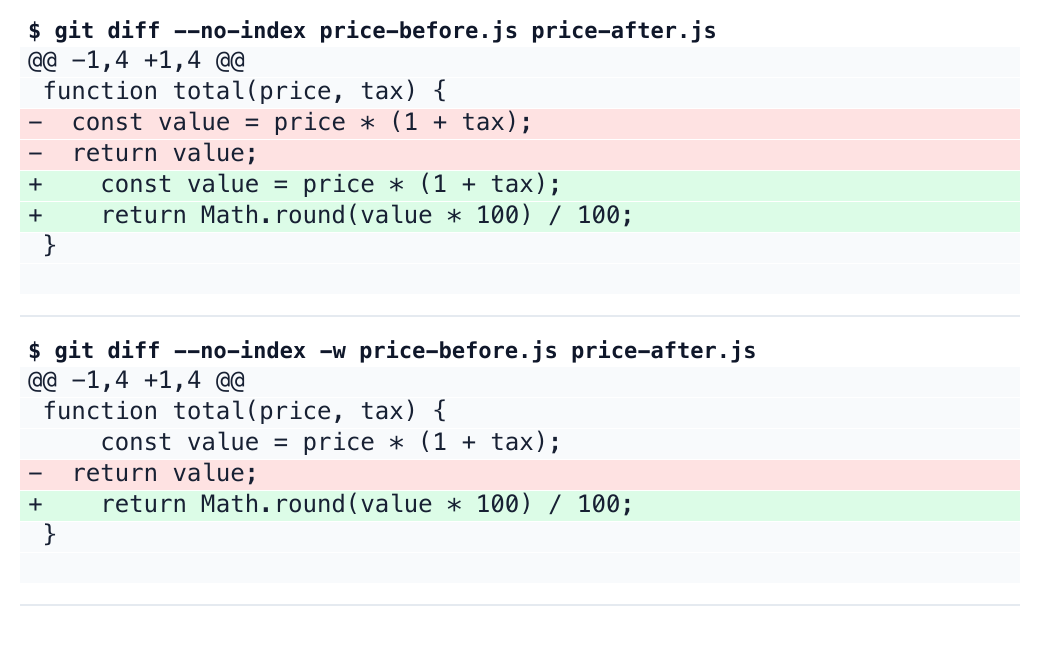
To make the difference concrete, we wrote a small JavaScript example. Both versions calculate a price including tax. The new version rounds the returned value to two decimal places, while indentation changes from two spaces to four. The image below contains actual local git diff output for this authored example; it is not a screenshot of the GitHub interface.
In the ordinary diff, the calculation and return statement appear together as replaced lines. With git diff -w, the calculation survives as context and the changed return statement stands out. That helps a reviewer spend attention on the rounding requirement: which callers expect an unrounded number, how negative values behave, and whether the existing amount tests describe the intended rule. The useful gain is a clearer order of reading, rather than proof that the change is safe.
Sometimes whitespace is the change
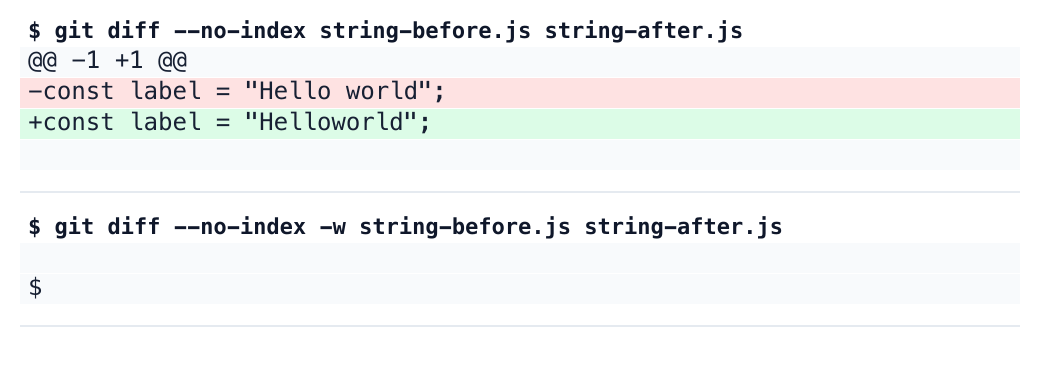
A filtered view is therefore an incomplete final view for some files. Python indentation, YAML nesting, and spaces inside a string can carry meaning. Changing "Hello world" to "Helloworld" alters visible output with only one removed space. Git’s -w option controls whitespace comparison; it does not interpret the semantics of the language or validate the resulting program.
In this deliberately small string example, -w hides the change completely and produces no diff output. The second image records the result we actually ran. This does not establish that every GitHub comparison behaves identically to local Git. It demonstrates why a quieter comparison deserves a second look wherever spacing matters. Revealing whitespace again is particularly useful before deciding that a string, indentation block, or configuration section is unchanged.
More room for a new file
The announcement also improves split view: new and deleted files now span both columns. A newly added file has no previous counterpart to compare against, so using the available width is a sensible fit. Long type definitions and descriptive test names should require less visual tracking around wrapped lines, even though the source itself is unchanged by this display choice.
For a PR mixing formatting with behavior, try reading the important calculation in the quieter view, then reveal whitespace to inspect strings and structure. Authors can make this easier by separating a formatting commit from the functional change. A saved preference removes repeated clicks and visual clutter. The final question remains what the program will do after the change, and the full diff is still useful evidence for answering it.
Official reading
GitHub Docs · Reviewing proposed changes
Checked against the official announcement and Git documentation on October 23, 2026; both example comparisons were executed locally.