
The Big One Dev Log: Why You Can’t Recast Even When Bait Is on the List

Store check, September 30, 2026: iOS 1.3.3 was released on September 29. Published changes cover chat translation and original-text switching, plus village entrances and navigation labels. The bait discussion below is a development note, not a claim that these bait mechanics were newly added in this release. App Store · 1.3.3
If you see a familiar icon on the bait list but casting is blocked, check the remaining quantity of that bait type first. A bait appearing on the list does not necessarily mean it is ready for use right now.
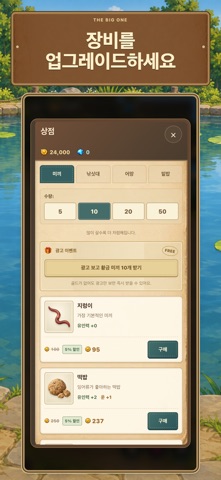
As a developer building The Big One, I’d like to share the logic behind out-of-bait notices. This explains how to read the screen based on the current implementation, and is not an announcement that a new store update has been released.
Why Bait Type and Quantity Are Kept Separate
Earthworms, dough bait, and minnows are distinct types of bait. While their icon and name show what you have selected, the image alone does not tell you if you have enough stock for the next cast.
In the current implementation, if the quantity of your selected bait is 0 or less, casting is prevented and an out-of-bait prompt appears. Simply reselecting the same bait will not increase your count, so it is faster to check both the name and the remaining count together.
Conditions for Prompts Indicating Other Bait Is Available
When determining whether you have alternative bait to switch to, the game excludes your currently selected type and checks if any other type in your inventory has remaining quantity. Simply having other names listed does not qualify as being switchable.
For example, if you have 0 earthworms and 3 dough baits, you can continue fishing by switching to another bait. Conversely, if earthworms, dough bait, and minnows are all at 0, merely switching types will not let you resume fishing. These numbers are examples used to explain the conditions, not granted rewards.
The Moment the Last One Is Used and the Next Attempt
The current flow verifies that bait consumption succeeds before permitting a cast. When the last remaining bait is used, rather than interrupting ongoing fishing with an out-of-bait notice, the game saves the state to display the notice upon returning to the home screen.
This is why you should distinguish between completing that final cast and having no bait left for the next one. An out-of-bait notice does not mean previously caught fish are gone, nor does it mean your recent cast was a failure.
Checking Your Goal Before Switching
If you have remaining bait, check the name and quantity on the equipment screen, then read the Fishpedia descriptions to see if it matches the fish you are targeting. Having inventory means you are able to use it, not that you are guaranteed to catch your target species.
Special attractant baits also have separate conditions checking whether the target species exists in the current fishing spot. Therefore, if casting is blocked while bait quantities remain, read the actual on-screen prompt rather than assuming every block is due to a lack of stock.
A Quick Check Before Visiting the Shop
First check the remaining quantity of your selected bait, and then the quantities of your other baits. If all options are empty, you can visit the shop to look for the types you need and check their purchase amounts.
Following this sequence helps avoid unnecessary purchases. Base your assessment of prices or unlock requirements on your current screen, and if you still have remaining stock, try pairing it with today’s collection goal.
A Screen That Clarifies Your Next Cast
Separating the bait type, selection state, and inventory stock is designed to help players easily decide their next action. The icons help you recognize the type, while the numbers help you determine whether you can keep going.
If you are new to The Big One, check out the game in the store below. If you are already out on the water, take a moment before your next cast to check the quantity beside your bait’s name.
Related articles
- The Big One Bait Depleted Guide: Switch While Fishing, Restock in the Shop
- The Big One Basic Bait Routine: When to Switch from Worm to Shrimp
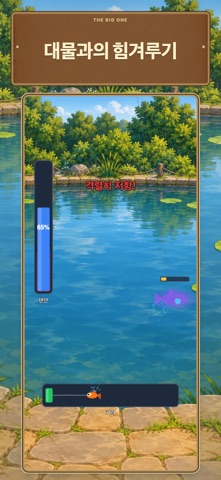
Official gameplay video (published 2026-09-29)