
The Big One casting guide: can you fish without groundbait?
Does fishing stop when you have no groundbait in The Big One? No. Ripples help you target a particular fish, but you can also cast into water with no visible ripple. These are different ways to begin a fishing attempt, rather than a paid gate and its workaround.
As the game's developer, the first exercise I suggest is not buying more consumables. Learn the tap that chooses a spot separately from the hold-and-release action on CAST. This guide follows the control instructions matching public iOS 1.3.3, checked on October 6, 2026; it does not describe an unreleased feature.
No ripple does not mean no fishing
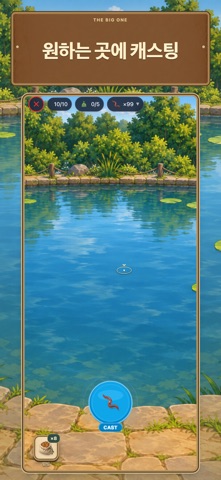
The current instructions say to tap the water to aim, then hold and release CAST. They also say that groundbait reveals ripples for three minutes and that you can still cast into clear water. Groundbait therefore helps make a target visible; it is not a mandatory ticket for every cast.
Distinguish choosing a particular fish from making an ordinary fishing attempt. Without a visible ripple, do not assume you have selected an invisible target. Practising one cast into clear water establishes a useful baseline: later, when ripples appear, you can compare the target-selection step with an action you already understand.
Choose the spot, then use CAST
Start by tapping one spot on the water, then hold and release CAST. The important habit is to avoid rushing the location choice and the cast confirmation into one confused gesture. If the input feels unclear, check your spot selection first on the next attempt and only then perform the button action.
The casting gauge has a highlighted region. The implementation matching the public version gives separate feedback when a cast is confirmed there. A good gauge timing, however, is not a guarantee of catching a specific species. Bite, hook and reeling stages still follow the cast, and each can change how the attempt ends.
Clear an unwanted ripple target
Tapping near a ripple targets that fish. The current instructions say that tapping clear water or the same ripple clears the selection. Before changing your objective, check whether a target is still selected; this makes it easier to avoid a cast whose purpose differs from what you intended.
Practise clearing the selection once. When a ripple is visible, select it, then tap that ripple again or tap clear water and read the changed instruction. Recognising selected and cleared states teaches more than repeated taps without checking what they did. It is a small exercise in reading the game's response.
Use three attempts to answer separate questions
Use the first attempt to see whether you can cast without a ripple, and the second to separate aiming from the CAST gesture. If ripples are visible, use a third attempt to compare selection and clearing. This is a suggested practice sequence, not a promise that three attempts will succeed or produce a particular fish.
When an attempt fails, avoid grouping every cause under a lack of groundbait. First check whether the cast was completed and which later stage ended the attempt. Follow the reeling guide for a fish lost during reeling, and use the Fishpedia article for a collection objective. That keeps another consumable from becoming the default answer to an unrelated control problem.
The public image and your next goal
The image is the free-casting promotional screen currently listed in the Korean App Store. Its current listing was verified, but its capture date and capture build are not public. One promotional image does not prove every clear-water situation or any catch probability; use it as visual context for the controls.
A useful small goal today is to explain the water you chose and the CAST you confirmed. It need not involve expensive equipment or a large fish. After learning the input sequence, watch the official gameplay video for the overall flow and choose a fish to catch yourself in Fishpedia.