
The Big One village navigation: find the entrance, then walk from the map

Returning from a fishing session can leave you looking at a building without knowing exactly where to tap. As the developer of The Big One, I want navigation to help the next fishing trip begin smoothly rather than become another puzzle.
Tapping artwork, choosing a destination and arriving there are different steps. This guide follows entrances, village maps and access conditions, with a simple aim: visit one useful place before returning to the water.
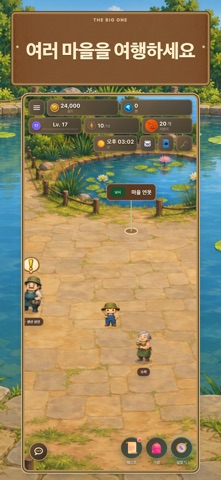
Look for the entrance, not the entire picture
On October 2, 2026, the Korean App Store lists public version 1.3.3, released September 29. Its release notes describe improved village entrances and navigation labels. Google Play confirms the same change.
Before repeatedly tapping a building image, check its entrance and label. In the matching release code, building entrances are separate tap targets from labels. When a label fades, look for the visible entrance instead of assuming every part of the artwork will perform the same action.
Choose one destination on the village map
The village map provides your current position and places and people to visit. Select a destination, then use Walk there to confirm where you are going. Choosing a village on the world map and choosing a place inside that village are separate decisions.
For a shop visit, select that place and check the navigation state. If your plan changes, use Stop navigation before selecting a new destination. Keeping one active intention makes the trip easier to follow than repeatedly choosing different targets.
Distinguish locked access from a navigation problem
If you see Locked or a level notice, read the access condition shown on screen. A navigation route does not grant access to an unopened region. This guide does not announce changed unlock levels or free instant travel.
You can finish preparations in the current village and return to fishing. Checking bait and equipment and solving one immediate need often fits a short session better than visiting every available destination.
Check your fishing screen after the visit
Once you arrive, confirm the destination screen, then check bait and your Fishpedia records before the next cast. The two related guides distinguish a bait entry from available inventory and fish information from your own catch record.
The linked official video illustrates fishing rather than this navigation procedure. The image is current Korean store promotional media, with unknown capture date and build. Follow the labels and notices on your own device when they differ from promotional artwork.
Related guides
- The Big One Dev Log: Why You Can’t Recast Even When Bait Is on the List
- The Big One Fishpedia: Distinguishing Known Fish from Fish You've Caught